Headless CMS erklärt
Storyblok is the first headless CMS that works for developers & marketers alike.
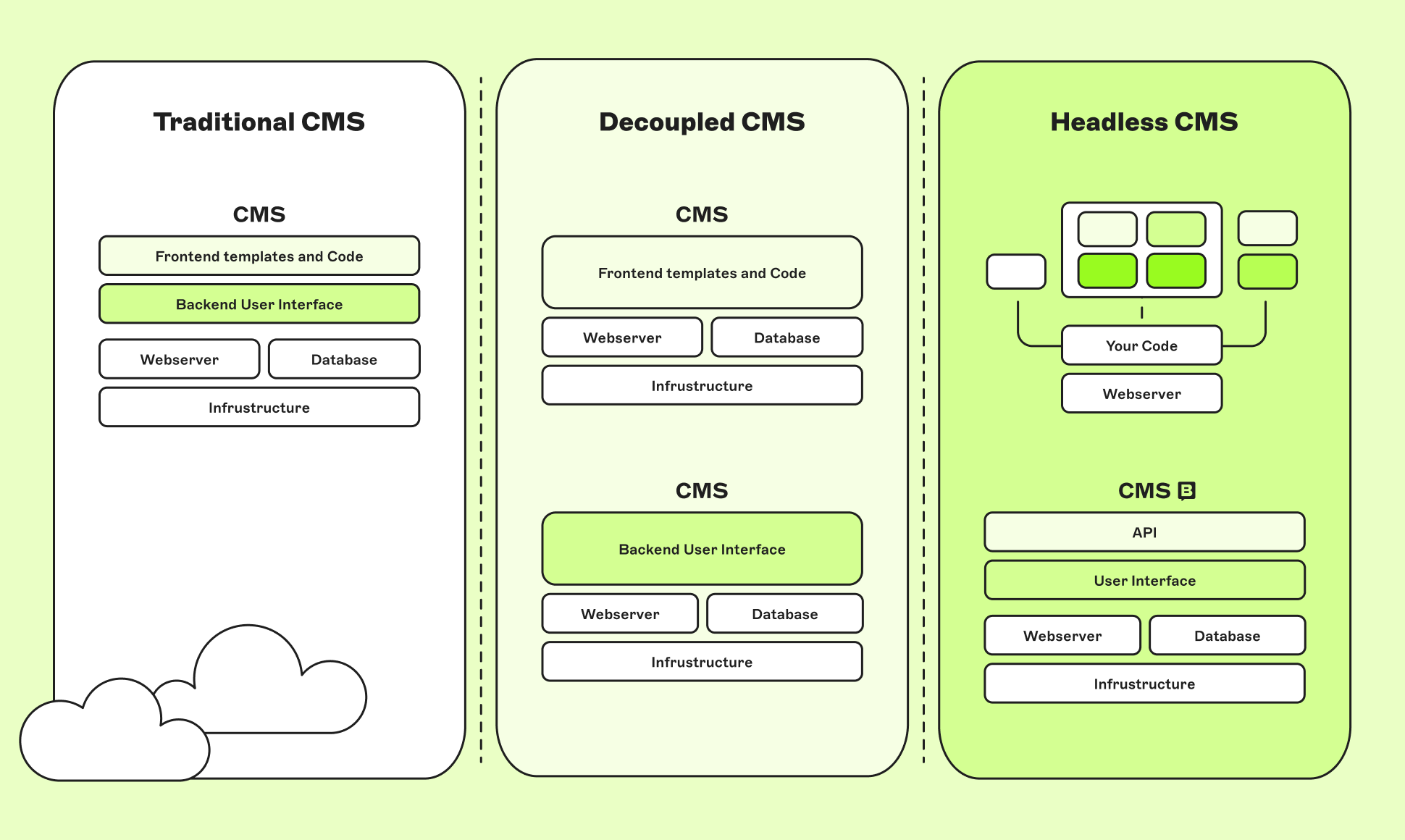
Ein Headless-CMS verwendet APIs, um Backend-Inhalte auf jedem Gerät anzuzeigen.
Nutze Geschwindigkeit, Agilität und Kontrolle für die moderne Content Erlebnisse.
In der heutigen digitalen Welt brauchen Unternehmen und digitale Teams ein Content-Management-System, das flexibel, skalierbar und zukunftssicher ist. Zeit für den Headless CMS – ein moderner Ansatz für die Content-Ausspielung, der sich von den Fesseln veralteter Systeme befreit.
Du fragst dich, was ein Headless CMS eigentlich ist, wie es funktioniert und warum es die Art und Weise verändert, wie Unternehmen Content managen? Dann bist du hier genau richtig. In diesem Guide erfährst du alles – von der Entwicklung des Content Managements bis hin dazu, wie ein Headless CMS sowohl Marketer:innen als auch Entwickler:innen neue Möglichkeiten eröffnet.
Was ist ein Headless-CMS?
Ein Headless CMS ist ein modernes Content-Management-System, das das Backend (wo Inhalte gespeichert werden) vom Frontend (wo Inhalte angezeigt werden) entkoppelt. In klassischen CMS sind diese beiden Teile fest miteinander verbunden – bei einem Headless CMS hingegen kannst du deine Inhalte auf jeder beliebigen Plattform ausspielen: Websites, Apps, IoT-Geräte, digitale Displays und vieles mehr – ganz ohne an eine bestimmte Benutzeroberfläche gebunden zu sein.
Fangen wir mit den Basics an: Der „Head“ steht fürs Frontend, der „Body“ fürs Backend. Indem man beides voneinander trennt, ermöglicht ein Headless CMS eine wirklich kanalübergreifende Content-Ausspielung – per API.
Aber wie kam es überhaupt dazu, dass wir Headless CMSs brauchen? Dafür müssen wir kurz zurückspulen und uns anschauen, wie sich Content-Management-Systeme entwickelt haben.
Ein kurzer Überblick über die Geschichte der CMS
Content-Management-Systeme (CMS) haben sich rasant weiterentwickelt, um den ständig wachsenden Anforderungen an die Erstellung und Verbreitung digitaler Inhalte gerecht zu werden.
Die Anfänge: Statisches HTML und manuelle Updates
In den 1990ern bestanden Websites aus statischen HTML-Dateien – von Hand programmiert und hochgeladen. Inhalte zu aktualisieren war langsam, technisch anspruchsvoll und kaum skalierbar.
Erste Generation: Dynamische CMS (späte 1990er–frühe 2000er)
Die ersten CMS trennten Inhalt von Darstellung und machten Web-Publishing auch für Nicht-Techniker:innen möglich. Systeme wie Vignette StoryServer (1997) und TYPO3 (1998) brachten benutzerfreundliche Oberflächen und revolutionierten das Website-Management.
Zweite Generation: Open-Source- und Enterprise-CMS (frühe–mittlere 2000er)
In den frühen 2000ern boomten Open-Source-CMS:
- WordPress (2003) – begann als Blog-Tool und wurde zum beliebtesten CMS der Welt.
- Drupal (2001) – bot tiefe Anpassungsmöglichkeiten für Entwickler:innen.
- Joomla (2005) – fand die Balance zwischen Bedienbarkeit und Flexibilität.
Gleichzeitig entstanden Enterprise-Lösungen wie Adobe Experience Manager (ehemals CQ5) und Sitecore, die komplexe digitale Anforderungen abdeckten.
Dritte Generation: Reifezeit der monolithischen CMS (späte 2000er–frühe 2010er)
Monolithische CMS entwickelten sich weiter und bekamen Features wie:
- Visuelle Page-Builder (WYSIWYG)
- Erweiterte Rollen- und Workflow-Modelle
- Plugin-Ökosysteme
- SEO-Tools
- Multi-Site-Management
Doch Backend und Frontend blieben eng miteinander verzahnt – die Flexibilität litt.
Vierte Generation: Der Aufstieg von Headless CMS (2010er – heute)
Mit der zunehmenden Bedeutung von Apps, Smart Devices und Omnichannel-Marketing kamen Headless CMS ins Spiel. Sie entkoppeln Inhalt und Präsentation vollständig und liefern Inhalte via API an jede Plattform. Pioniere wie Storyblok, Contentstack und Contentful definierten Content-Management für das moderne Web neu – flexibel, skalierbar und zukunftssicher.
How does a headless CMS work?
A headless CMS stores the content and allows any frontend or device to consume it via APIs, supporting flexible, omnichannel publishing. To understand the power of a headless, it helps to break down how it actually operates.
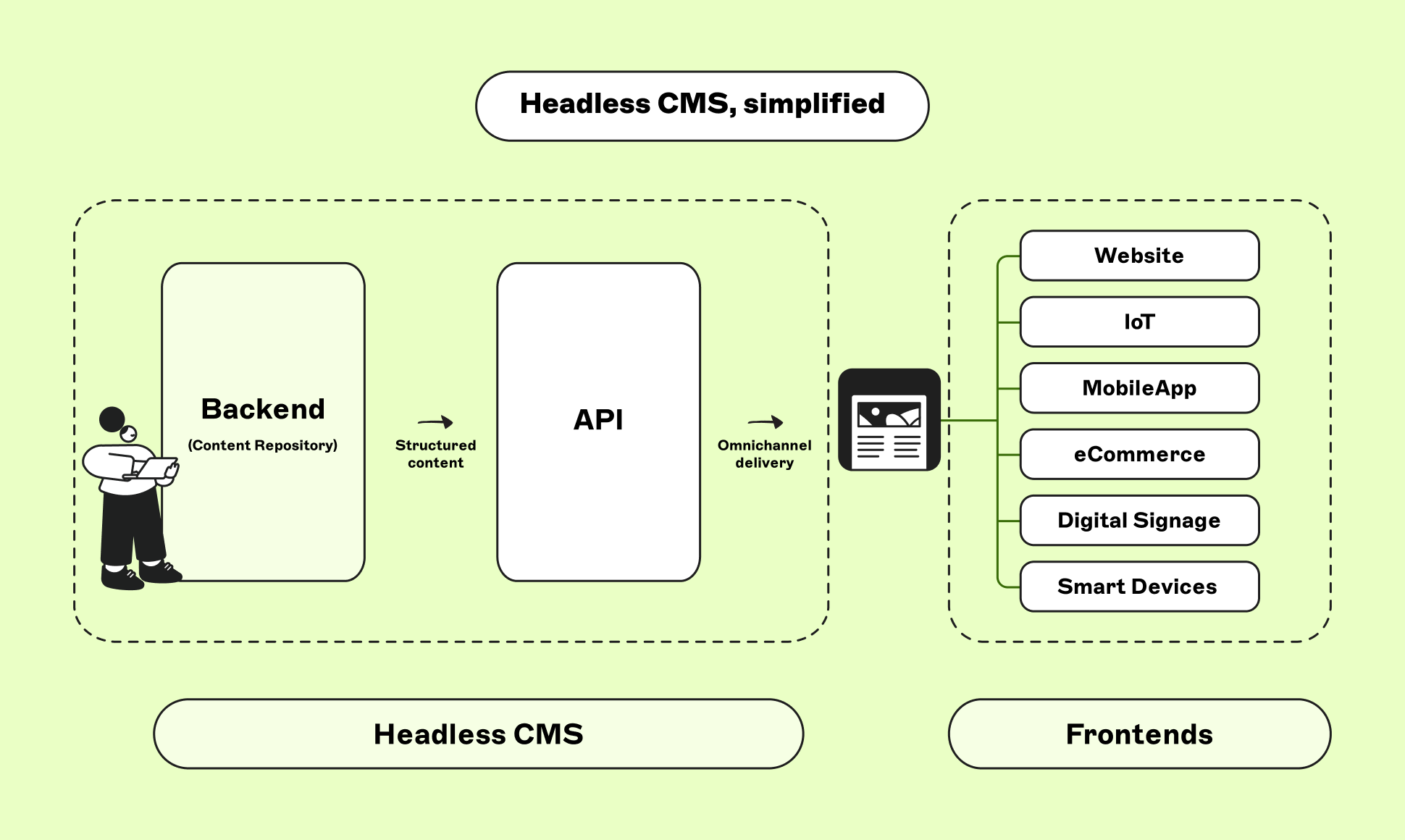
There are three layers to the functionality of a headless CMS, each responsible for a different stage in the content life cycle—from where the content is created and stored, to how it’s distributed, to where it's displayed:
- Content layer: This is where content is created, structured, and stored, decoupled from any specific design or layout. Content creators log in to this typical CMS interface to create and edit content based on the content models or schemas that developers have already defined.
- API layer: This is the bridge through which you deliver content to your preferred channels. Thanks to APIs, teams can seamlessly plug into search, e-commerce, analytics, personalization, and numerous other third-party tools. These tools can be mixed, matched, and swapped to evolve with business and team needs.
- Presentation layer (frontend): Developers can use any technology or frontend framework — from Next.js (opens in a new window) to Astro (opens in a new window) to mobile — to display content wherever needed. For content creators, distribution is as simple as clicking “publish,” and content is delivered simultaneously to any number of selected channels.
By separating content from presentation, a headless CMS allows you to create once and publish everywhere: websites, mobile apps, kiosks, you name it. Teams aren’t constrained by rigid templates or coupled systems, enabling faster iteration and easier content scaling with a system built for modern multi-channel expectations.
What are the different types of headless CMS?
Headless CMS software comes in several forms, each with pros and cons. Sufficient research is highly encouraged before deciding on the headless CMS that fits your team and business needs.
- API-first Software-as-a-Service (SaaS): These cloud-native platforms are often referred to as headless CMS as a service. They offer a fully managed backend with automatic updates, built-in security, and effortless scalability — so teams can focus on building, not maintaining infrastructure. Content is delivered via APIs (REST or GraphQL), and you get a clean UI and structured workflows out of the box. Examples: Storyblok, Contentful, Hygraph
- Git-based headless CMS: These store content as flat files and integrate directly with your codebase. Popular among developers who want full control and prefer working in Git workflows. Examples: CloudCanon, TinaCMS, Decap CMS
- Hybrid headless CMS: Traditional CMSs that include API capabilities. They still come with built-in rendering engines, but they can be decoupled to support some headless flexibility.
Examples: WordPress with REST API, Drupal with JSON: API
A technical deep dive into headless architecture
Do you want to dive even deeper into the API-first, layered architecture that supports many headless content management platforms? Look no further.
How does headless frontend architecture work?
Modern JavaScript-based frontend frameworks are an ideal match for a headless CMS. Using dedicated SDKs (opens in a new window) (software development kits), developers can use the framework of their choice to handle page routing, integrate specialized third-party libraries, and leverage API-based workflows to consume structured content that generates standard markup.
This architecture improves performance and scalability, and gives developers more freedom than traditional CMSs.
Headless hosting & delivery: where to host your headless CMS
Because headless CMSs are decoupled from the presentation layer, teams can choose how and where to deploy projects. This separation makes hosting far more flexible than traditional monolithic CMSs, as the backend and frontend are managed, optimized, and scaled independently.
- Backend (CMS layer): If you're using an API-first SaaS like Storyblok, the platform is fully managed in the cloud — no setup needed.
- Frontend (presentation layer): You can deploy your frontend anywhere using cloud platforms like AWS, Google Cloud, or Azure, as well as hosting companies like Netlify, Vercel, and Cloudflare, which offer fast, secure delivery via global Content Delivery Networks (opens in a new window) (CDNs).
This decoupled model can reduce maintenance complexity and simplify continuous delivery (opens in a new window) and rapid iteration. Teams can scale, update, and optimize each part of their digital experience independently — achieving better performance, improved uptime, and a smoother workflow between developers and content creators. It’s the golden ticket to easier, high-quality content delivery.
How does API orchestration work?
To make all these services work together seamlessly, headless CMSs rely on API orchestration. This process ensures that content from the CMS can be fetched alongside data from other specialized services — such as eCommerce platforms, personalization engines, or customer data platforms (CDPs) — and then stitched together at build time or runtime to deliver dynamic experiences across channels.
For example, a single page could pull in:
- Product information from an eCommerce API
- Content and images from the CMS
- Personalized recommendations from a Customer Data Platform (CDP)
- Localized content from a 3rd-party translation provider
This modular, API-driven approach allows you to choose the service, tool, or solution that perfectly matches your project and/or business needs, making the system altogether more adaptable. Headless architecture is less about one tool doing everything and more about a flexible, connected ecosystem working harmoniously to deliver rich, real-time digital experiences.
Headless CMS vs. Traditionelles CMS: Wo liegt der Unterschied?
Du bist dir noch nicht sicher, ob ein Wechsel zu einem Headless CMS das Richtige ist (opens in a new window)?
Hier ist ein schneller Vergleich:
Headless CMS | Traditionelles Content-Management-System | |
Flexibilität | Volle Kontrolle über das Frontend | Eingeschränkt durch vorgefertigte Templates |
Geschwindigkeit und Performance | Schnell, skalierbar, API-basiert | Langsamer durch monolithische Struktur |
Multi-Channel-Support | Content auf jedem Kanal ausspielbar | Meist auf Websites beschränkt. |
Freiheit für Entwickler:innen | Beliebige Frameworks nutzbar | An bestimmte Themes oder Code gebunden |
Der Wechsel zu einem Headless CMS gibt dir die Flexibilität, dich an neue Technologien anzupassen, Inhalte überallhin auszuliefern und dein digitales Erlebnis zukunftssicher aufzustellen.
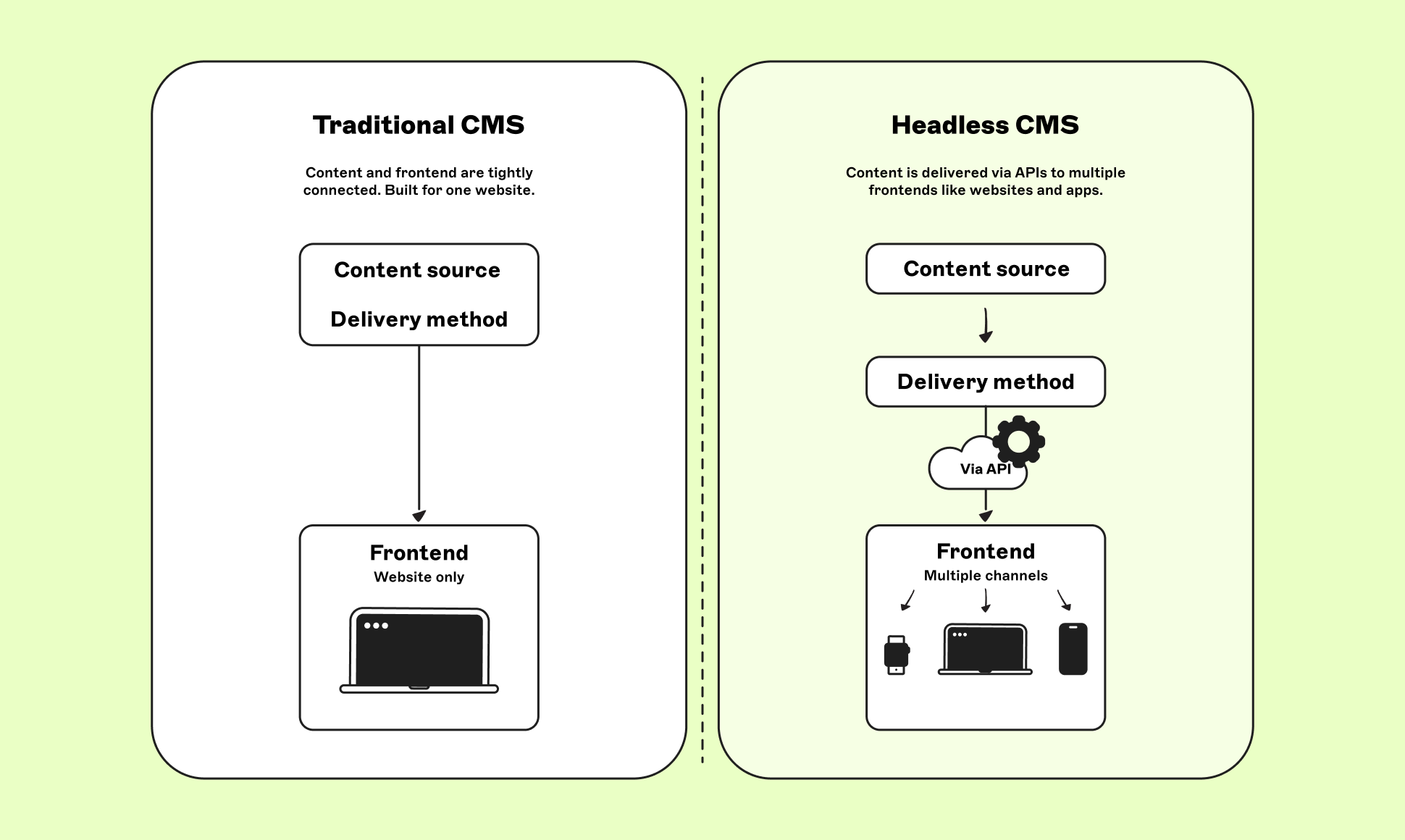
| Traditional CMS | Headless CMS | |
|---|---|---|
| Design | Built-in specific themes and page templates | Complete control over the frontend (presentation) |
| Flexibility | Backend and frontend tightly coupled | Backend and frontend are fully separated, connected via APIs |
| Speed and performance | Requires effort to tune servers and improve performance | The right framework delivers fast loading times and optimized performance out of the box |
| Multi-channel support | Publication limited to one frontend (channel) | Built for omnichannel — websites, apps, IoT, and more |
| Maintenance | Requires ongoing server maintenance | Highly scalable and cloud-native by design |
| Developer experience | Tied to a specific tech stack | Full freedom to use any tech stack |
| Editor experience | Often requires developer input to edit and publish | Full autonomy to edit and publish as required |
| Best for | Dedicated full-stack and DevOps teams able to provide constant maintenance and support | Agile, frontend-focused teams responsible for the initial setup and occasional development tasks |
You may have come across the term decoupled CMS, which sits somewhere between a traditional CMS and a fully headless CMS. In this hybrid setup, the backend and frontend are separated but still connected — the CMS manages content and may include a default presentation layer, while also exposing APIs for delivering content to other channels. This contrasts with a fully headless CMS, which focuses entirely on the content repository and APIs, leaving all presentation responsibilities to the front-end frameworks or applications.
Warum Entwickler:innen Headless CMS lieben
Für viele Entwickler:innen ist ein Headless CMS ein echter Gamechanger – und das aus guten Gründen:
- Flexibilität im Frontend: Nutze jeden Tech-Stack – ob React, Vue, Svelte, native Apps oder IoT-Geräte.
- Schnellere Entwicklung: Frontend und Backend können unabhängig voneinander gebaut werden.
- Einfache Integrationen: Binde Suche, E-Commerce, PIM & Co. ganz einfach per API an – schnell, flexibel, plug & play.
- Skalierbarkeit: Wächst mühelos mit – über alle Kanäle und Regionen hinweg.
Ein Headless CMS gibt Entwickler:innen die Freiheit, schnelle, skalierbare und maßgeschneiderte digitale Experiences zu bauen.
For search engine optimization (SEO)
Traditional CMSs often struggle with performance and flexibility, which are critical to SEO. Headless CMSs fix that by giving you a cleaner, faster, more customizable setup:
- Faster load times thanks to modern frameworks and CDN delivery — search engines value performant sites and fresh content.
- Clean, structured content that supports schema markup, hreflang tags, and optimized metadata to increase your chances of discoverability.
- Mobile-first optimization is baked into the frontend technology — because modern audiences aren’t limited to searching on desktop alone.
- Global SEO at scale, with multilingual content and localized URLs managed from one place, so you make it into the top rankings everywhere you need to be.
What is headless SEO, and how does it work?
Interested in understanding how SEO with a headless CMS works? Let’s get into it.
SEO is the process of improving a website’s visibility in search engine results by optimizing content, keywords, and technical factors to increase organic traffic. In a headless CMS, where the frontend is separate from the content layer, SEO depends heavily on how content is structured, delivered, and rendered within that decoupled architecture. A practice that has become even more important for AI search discoverability (more on that below).
Here’s how to handle rendering so that search engines can successfully crawl a site getting its content from a headless CMS:
- Static Site Generation (SSG): Pages are generated at build time and delivered instantly to users through a CDN. Thanks to reduced load times and consistent markup, SSG is fast and SEO-friendly.
- Structured content: Content is stored in a structured format, making it simple to implement metadata, schema markup, and other SEO-critical elements that help search engines understand and rank your content.
- Custom control: Developers can build SEO best practices directly into each component — no bloated plugins or rigid templates, just clean, performant code optimized for discoverability and speed.
Put simply: SEO in a headless setup works differently from its traditional counterparts, but when done right, it’s faster, more flexible, and often more effective.
For generative engine optimization (GEO) and AI search
Generative engines — also known as AI search engines — are rewriting the rules of discoverability. Unlike traditional search, where users click through links, AI-powered tools like ChatGPT, Perplexity, and Microsoft Copilot deliver direct answers, often pulling from multiple sources. That means how you structure, manage, and deliver your content is more important than ever.
AI search engines now interpret content through entities, structure, and cross-referenced credibility rather than keywords. Traditional CMSs, built for static pages, often require more input and complexity for teams when trying to deliver the structured, consistent, and multi-channel content these models favor. Leaving developers and marketers bogged down in manual updates instead of moving at AI speed.
Being future-ready means making your content AI-discoverable today. Brands that adopt clean, structured content management now are the ones these tools will surface tomorrow, improving visibility, driving engagement, and shaping the customer experience in an era where AI answers replace traditional search results.
In this article, we share the five signs your CMS can’t keep pace with AI search — from outdated content destroying credibility to inconsistent omnichannel messaging that confuses AI engines.
Do you really need a headless CMS?
A headless CMS isn’t for everyone. But if your business is starting to feel limited by a traditional setup, it’s time to consider the switch.
You’re ready for headless if:
- You need to publish content across multiple platforms or channels.
- Your marketing and development teams are bottlenecked by each other.
- You plan to scale globally, support multiple brands, or localize content (and want to do this easily).
- You’re investing in modern frontend frameworks or a modular, API-connect stack (composable architecture).
If your digital strategy demands speed, flexibility, and future readiness, going headless will serve as both a technical upgrade and a competitive advantage. Headless CMSs are designed to support everything from global sites to agile micro-projects.
Real use cases for headless CMSs today
- For marketing websites and landing pages: Quickly build, test, and iterate without developer delays.
- For multi-site or multi-brand platforms: Manage dozens of websites from a single backend, with shared components and localized content.
- eCommerce storefronts: Combine content with product data for seamless, high-converting shopping experiences.
- Mobile apps and smart devices: Reuse content across platforms, from your website to your app to in-store displays or kiosks.
- Campaign microsites: Launch fast, look great, and update without code.
- Internal tools and customer portals: Deliver structured, permission-controlled content experiences for any user — internal or external.
The result? If your content needs to live in more than one place, evolve quickly, or serve diverse audiences, a headless CMS can handle it.
How to choose the right headless CMS from the market
Not all headless CMSs are created equal. The right fit depends on your team, tech stack, and business goals. Here’s what to consider when evaluating headless CMS options:
- Ease of use: Does the interface work for developers and content editors?
- Content modeling flexibility: Can you build the structures your team actually needs?
- Preview & publishing workflow: Is it easy for non-technical users to review and launch content?
- Integration capabilities: Can it connect with the tools you already use (e.g., eCommerce, analytics, personalization, etc.)?
- Localization support: Is it built for multilingual, multi-regional content?
- Scalability & performance: will it grow with you as you add new markets, channels, or brands?
- Support & documentation: Is the platform well-documented and supported for both devs and marketers?
How to migrate to a headless CMS
Migrating to a headless CMS doesn’t have to be overwhelming — the key is planning, collaboration, and understanding your content model. Whether starting fresh or bringing over parts of your existing site, migration is an opportunity to rethink your architecture, streamline workflows, and modernize your content delivery.
The headless CMS migration checklist
✅ Plan your approach: Decide whether to recreate from scratch or migrate existing content.
✅ Redesign your content model: Define flexible content structures that fit your new CMS and future needs.
✅ Map and migrate content: Identify what should be imported programmatically and what’s better recreated manually.
✅ Migrate assets thoughtfully: Maintain metadata, avoid duplicates, and protect SEO rankings.
✅ Customize your new CMS: Recreate editor features, dashboards, or custom fields.
✅ Collaborate with editors: Involve them early — their feedback ensures a smooth, functional migration.
Read the full guide on migrating to a headless CMS to explore detailed examples, best practices, and technical steps.
The best practices for setting up your headless CMS
Going headless gives you a highly customizable content platform, but success depends on how you structure and configure it from day one.
Is Storyblok the headless CMS you’ve been looking for?
Storyblok is a headless CMS that enables marketers and developers to create with joy and succeed in the AI-driven content era. It empowers you to deliver structured and consistent content everywhere: websites, apps, AI search, and beyond.
Marketers get a Visual Editor with reusable components, in-context preview, and workflows to launch fast and stay on brand. Developers have the freedom to use their favorite frameworks and integrate with anything through the API-first platform. Brands get one source of truth for accurate, flexible, and measurable content.
Legendary brands like Virgin Media O2, Oatly, and TomTom use Storyblok to make a bigger, faster market impact.
Storyblok enabled us to achieve a multi-million-pound annual saving, streamlining and centralizing multiple platforms and use cases into one.

If you’re a team looking to deliver faster and easier across any channel you choose and remain competitive in today’s market, Storyblok is a strong choice on the headless hunt. Our enterprise-ready CMS offers a single source of truth in the content chaos and allows you to securely deliver anywhere with just one click, integrating seamlessly with your choice of tech stack.
Built-in features to enable content delivery success
Storyblok is engineered to make creating, managing, and delivering omnichannel global content faster, more efficient, and more enjoyable. A mission supported by a feature set built to bridge the gap between marketers and developers, and provide the speed, agility, and control that every team working with content needs today.
- Visual Editor: Create content intuitively and collaboratively with live visual editing for a better, faster workflow with real-time iterations.
- Component Composer: Efficiently create, manage, and reuse components across projects for faster content development at scale.
- Powerful APIs: REST and GraphQL APIs make integrating with anything and publishing across any channel easy.
- Auto-scaling: Automatic scaling during high-demand periods that seamlessly scales capacity during service peaks — no blackouts or breakages here.
- Custom Workflows & Collaboration Suite: Define custom workflows by content type or use the standard to cycle through ‘draft’, ‘review’, and ‘publish’ stages. Collaborate exactly where needed with component-level comments, integrated discussions and workflows within our Visual Editor, and our Ideation Room.
- Localization & translation: Localize your content easily with native field-level and folder-level translation capabilities for simple multi-language and multi-country content delivery. Unlock global agility at your fingertips with AI translations.
- Global CDN: All content is served via a CDN that securely delivers data faster with low latency and at high transfer speeds.
- Enterprise-grade security: The Storyblok Trust Center covers every aspect of data and infrastructure security, governance, and legal and compliance.
…and so much more.
How easily can you integrate Storyblok with your current stack?
Our API-first system ensures the answer to that question is: very easily. Storyblok is a modern headless CMS designed to fit into your ecosystem, not the other way around. Storyblok’s composable architecture lets you integrate with tools and technologies you already use, for example:
- Hosting: Choose any hosting provider from Netlify to Vercel to Cloudflare— in fact, we now have a Netlify frontend hosting option available to take care of that for you from the start, or you can stick to the provider you prefer.
- Digital Asset Management: Use Bynder, Cloudinary, or another.
- Localization: Engage your audiences everywhere with Smartling, Lokalise, TransPerfect, and more.
- Personalization: Tailor experience to individual users with Dynamic Yield, VWO, or other tools of your choosing.
- eCommerce: Let the sales roll in with Shopify, BigCommerce, and other headless eCommerce tools.
- Search: Boost search performance with tools like Algolia.
- Product Information Management (PIM): Simplify and centralize product data and information with a PIM tool.
The result? A composable, API-connected tech stack where your content flows freely while powering consistent, high-quality experiences everywhere.
Storyblok scaled exactly to how we imagined our use cases to grow. We were able to cut down development time from a matter of 8 to 10 weeks to just a few days.

Support that scales with you
From onboarding to scaling, Storyblok is designed to support teams of every size from day one:
- API documentation: Developer-first guides and references
- Community resources: Tutorials, webinars, and a thriving global network
- 24/7 support: Reliable help whenever you need it
We’re not just a CMS. We’re your long-term content partner.
Learn the fastest way to build a CMS project in your preferred framework in just two steps with the Storyblok Quickstart guide.
Global brands that have already switched to Storyblok
Don’t take our word for it, take theirs:
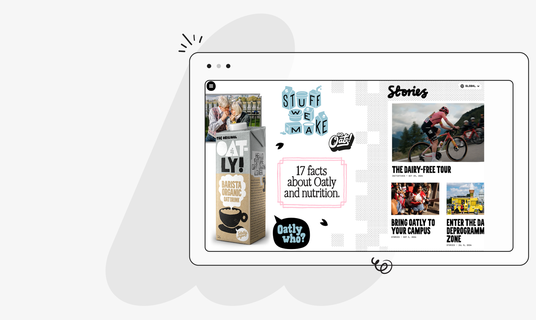
Oatly
Launched in 16 markets in just 2 months with a fast, functional, beautifully-branded new website.
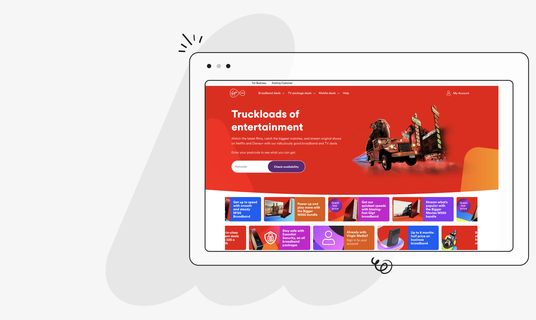
Virgin Media O2
Saved £2M+ in annual savings by eliminating overlapping CMS tools and services, empowering 10,000 team members and 600 locations.
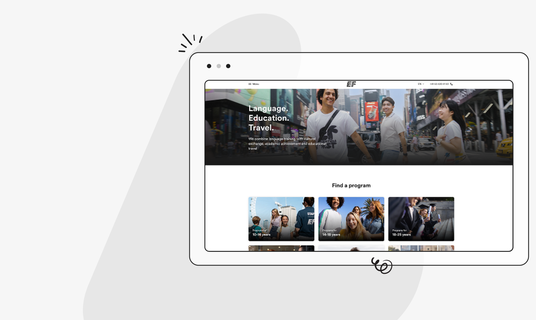
Education First
Rebuilt 486,000 pages across 60+ languages in 1 hour using our headless CMS.
Häufig gestellte Fragen zu Headless
Was ist ein Headless-CMS?
Ein Headless CMS trennt die Content-Verwaltung (Backend) von der Content-Auslieferung (Frontend) über APIs.
Warum auf ein Headless-CMS umsteigen?
Für mehr Flexibilität, schnellere Markteinführung und nahtlose Omnichannel-Auslieferung.
Hilft ein Headless-CMS bei SEO?
Ja – durch schnellere Ladezeiten, bessere Performance auf mobilen Geräten und volle Kontrolle über SEO-Elemente.
Kann es mit anderen Tools integriert werden?
Absolut. Storyblok verbindet sich mit eCommerce-Plattformen, CRMs, Analysetools und vielen mehr.
Questions or Feedback?
Join our Discord (opens in a new window)Author


