In Defense of Devs: The Cost of Great People Working With a Bad CMS

Storyblok is the first headless CMS that works for developers & marketers alike.
TL;DR
Legacy CMSs are a leading source of developer frustration — generating technical debt, restricting frontend flexibility, and leaving content teams dependent on developer support for tasks they should be able to handle independently. The root cause is the outdated, monolithic architecture that wasn’t built for today’s digital demands and can’t easily adapt, integrate, or scale.
58% of developers consider quitting their jobs because of inadequate tech stacks — that's more than half of your team ready to walk out the door, not because of salary or culture, but because the tools available to them simply aren't good enough.
And it’s fair enough, right? We wouldn't ask a Formula 1 team to race on bicycle tires, so why do we expect our developers to succeed in our rapidly evolving digital landscape with tools that predate the very problems they're now expected to solve? Especially as AI, personalization, and multi-channel delivery have completely rewritten what digital experience looks like and the expectations that follow.
Keeping pace means building on tech that's genuinely fit for purpose — flexible, composable, built for the speed of today’s digital demands. But even teams that invest in modern infrastructure often find one layer quietly undermining everything else: content delivery. The part of the stack rarely featured in architecture reviews, but everyone feels in the sprint.
Unclear ownership, mounting developer tickets for even the most basic content updates, and workarounds that become permanent fixtures. Content delivery can often be where velocity goes to die, and it's almost always traced back to a content management system (CMS) that was never built for what's being asked of it. This is the case in defense of developers who hate your CMS — and it's a strong one.
Why your developers hate your CMS
Here's the irony at the heart of most CMS frustrations: the system that was supposed to make content management easier has become one of the biggest drains on developer time. Many CMSs were never truly built for self-sufficiency. Content updates that should sit firmly in a marketer's hands — a headline change, a new landing page, a product description update — end up as dev tickets. Because the system is too rigid or too unintuitive for anyone without a development background to confidently use.
So your developers, the people you need focused on building, integrating, and innovating, are stuck in a queue of content requests. And on the other side of that queue is a marketing team that can't move at the speed the business needs. According to the Stack Overflow Developer Survey, technical debt is the top source of frustration at work for developers, garnering 62.4% of the vote. A CMS that requires constant workarounds and developer content handling is a direct and significant contributor to that number.
What is a legacy CMS?
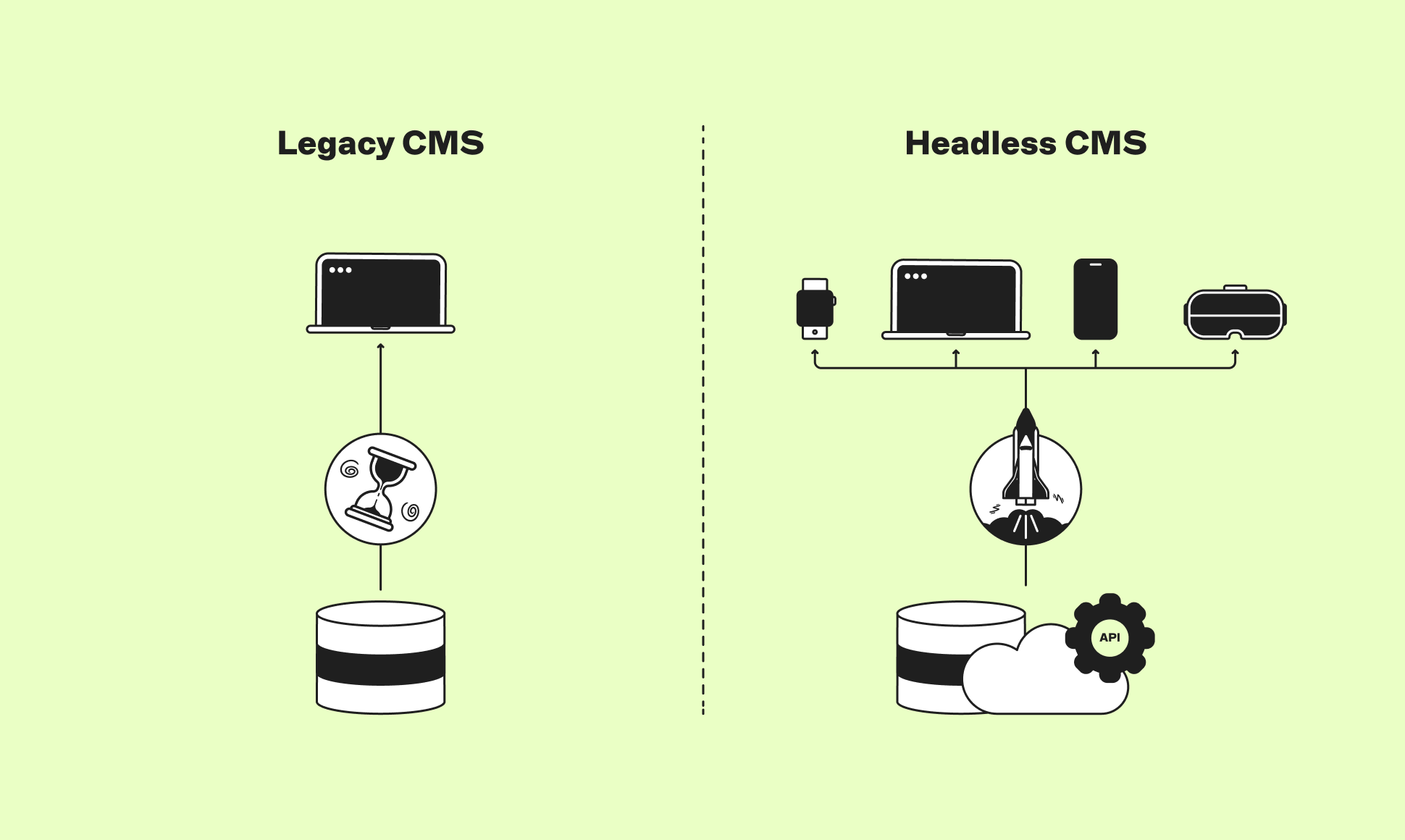
A legacy CMS is an outdated content management system, typically built on a monolithic, tightly coupled architecture in which the content, the backend (server infrastructure), and the frontend (content display) are deeply intertwined.
Systems like older versions of WordPress or Drupal often fall into this category. These platforms usually require significant custom code for changes, offer limited integration with modern APIs and digital tools, and may lack up-to-date security updates, increasing maintenance risks. They can also depend heavily on specialists familiar with older technologies, which drives up operational costs. Despite these drawbacks, legacy CMSs are still used because they often continue to function for basic needs, and organizations fear that the cost and complexity of migration to modern systems is too high.
A headless CMS is a content management system that decouples the content repository (the "body") from the presentation layer (the "head"). Content is stored in a structured backend system and delivered via APIs to any frontend or channel that needs it — a website, mobile app, digital display, or any other touchpoint. See how legacy and headless CMSs compare in the table below.
Unpacking the limitations of a legacy CMS
1. Content is locked to one channel
Legacy CMSs were built for the web at a time when the web was the only channel that mattered. Today, content needs to reach mobile apps, digital signage, voice interfaces, third-party platforms, and AI-powered touchpoints. Because a legacy CMS binds content and code, redistributing that content to other channels requires recreating it from scratch, which is neither efficient nor scalable.
2. Developers are restricted to the platform's frontend stack
Most legacy CMSs dictate which frameworks developers can use. Modern JavaScript frameworks — Next.js, Nuxt, Astro, or Svelte — are either unsupported or require significant workarounds. This isn't just a preference issue: it limits performance, slows new developer onboarding, and prevents teams from adopting frontend innovations as they emerge. It also contributes directly to technical debt.
3. Integrations are painful and fragile
A monolithic, legacy CMS is an all-in-one system, which sounds convenient until you need to connect it to anything else. Integrating with a CRM, personalization engine, analytics platform, or commerce layer typically requires custom development work that is difficult to maintain and expensive to change. A CMS that treats every integration as a bespoke engineering project is a serious bottleneck.
4. It doesn't scale for enterprise complexity
Larger organizations typically need multi-market content strategies, regional localization, granular publishing workflows, and role-based access controls. Legacy CMSs were rarely designed for this kind of operational complexity. The result is workarounds that create more technical debt, which in turn creates more work for developers — a frustrating cycle that's hard to escape without a platform change.
5. It is not AI-ready
This is the most urgent limitation for teams operating in today’s AI-driven market. AI is reshaping how digital experiences are built and consumed — from AI-assisted content creation to personalization engines to AI search. While some content structuring is possible in a monolithic CMS, content is typically tangled up with presentation markup, the API layer was never designed as the primary delivery mechanism, and content tends to be organized around pages rather than reusable components. All of which makes it significantly harder to expose clean, structured content to AI tools and crawlers — and in a world where AI discoverability is a core business objective, that friction has real consequences.
Read this article and delve into the five signs it might not be — and what to do about it.
What is the business cost of a legacy CMS?
The friction developers experience with a legacy CMS is not just an inconvenience or source of frustration; it has measurable business consequences.
Research from McKinsey found that technical debt can account for 20–40% of a company's technology estate — that is budget that could be better spent on new features, improved user experiences, or meaningful innovation.
It is also a talent retention issue. The Stack Overflow Developer Survey found that 80% of developers reported being unhappy or complacent in their jobs, with technical frustrations among the leading causes. Developers who spend their days managing content tickets and working around platform limitations are a real talent retention risk.
For digital and engineering managers, the question is not whether a legacy CMS is causing friction. It is how much that friction is actually costing — in productivity, in delivery speed, and in the people you cannot afford to lose.
Uncover why modern audiences and AI algorithms won’t wait for slow websites and performance to catch up, and how your legacy CMS could be the culprit behind lost opportunities in this whitepaper.
| Feature | Legacy CMS | Headless CMS |
|---|---|---|
| Content delivery | Single channel (web) | Omnichannel via API |
| Frontend flexibility | Platform-defined | Any framework you choose |
| Integrations | Custom plugins, fragile connectors | Standard APIs, seamless integration |
| Speed and performance | Requires effort to tune servers and improve performance | The right framework makes it intuitive to deliver fast loading times and optimized performance |
| Maintenance | Requires ongoing maintenance | Highly scalable and cloud-native by design |
| Editor experience | Often requires developer involvement to edit and publish | Full autonomy to edit and publish as required |
| Scalability | Limited — platform constraints make it hard to support multiple markets, languages, and teams | High — composable architecture scales across markets, teams, and channels without platform restrictions |
Legacy CMS vs. headless CMS: which is right for your team?
- Stick with a legacy CMS if you can spare a dedicated team of full-stack and DevOps engineers needed to provide ongoing maintenance and support.
- Choose a headless CMS if you have an agile development team responsible for the initial setup and occasional customization tasks.
Uncover what sticking with your current setup is costing you in The Cost of Doing Nothing: How Legacy Tech Dulls Your Competitive Edge (Sitecore Edition)
The bottom line
Your developers do not hate content management systems. They tend to hate content management systems that were not built for how digital teams actually work today.
The monolithic (now legacy) CMS was a reasonable choice many years ago, but the world has moved on — and if the pain points detailed in this article sound all too familiar, your CMS likely needs to do the same.
A modern headless CMS — one that gives content teams the visual experience they need and developers the freedom they deserve — is not just a better developer experience. It is a better business outcome: faster content cycles, cleaner integrations, genuine omnichannel capability, and a content foundation that is structured and ready for AI-powered experiences. That is the case in defense of developers who complain about your legacy CMS. And it’s a strong one.
Frequently asked questions about legacy CMS
- What does legacy CMS mean? A legacy CMS is a traditional content management system built on tightly coupled, monolithic architecture where content, code, and presentation are interdependent.
- Why do developers dislike legacy CMSs? Developers dislike legacy CMSs primarily because they restrict frontend flexibility (forcing use of the platform's own templates), make API integrations difficult, and generate technical debt through workarounds. They also create dependencies: content tasks that should be self-served by marketers are routed back to developers because the CMS is too rigid for non-technical users to operate confidently.
- What is a headless CMS? A headless CMS is a content management system that separates the content backend from the frontend presentation layer. Content is stored in a structured repository and delivered via APIs to any channel — websites, mobile apps, digital signage, or AI interfaces — giving development teams full freedom over how and where content is displayed.
- What is the difference between a headless CMS and a legacy CMS? A legacy CMS couples content to a single presentation layer and provides a WYSIWYG visual editor for making changes. A headless CMS stores content separately and delivers it via API to any channel. Headless CMSs offer greater developer flexibility, omnichannel capability, and AI readiness.
- Is Storyblok a legacy CMS or a headless CMS? Storyblok is a headless CMS with a built-in Visual Editor. It gives content teams the autonomy to create, update, and publish content while giving developers the API-first, framework-agnostic architecture of a modern headless platform. It is MACH-compliant and supports frameworks including Next.js, Nuxt, Astro, React, and Vue.
- What is the best CMS for developers? Developers consistently prefer headless, API-first CMSs because they allow full choice of frontend framework, provide clean REST or GraphQL APIs for integration, and avoid the technical debt that accumulates from monolithic platform constraints. Storyblok is frequently cited as a strong choice because it balances developer freedom with a visual editor that reduces the content request burden on development teams.
- How does a CMS affect developer retention? According to the Stack Overflow Developer Survey, technical debt is the number one frustration for 62% of developers. CMSs that generate constant workarounds, restrict framework choice, and route content tasks back to development teams are a significant source of that frustration. For engineering and digital managers, CMS selection is a meaningful factor in developer satisfaction and retention.
- What is a MACH-compliant CMS? MACH stands for Microservices, API-first, Cloud-native, and Headless — a set of architectural principles that define modern, composable digital infrastructure. A MACH-compliant CMS, like Storyblok, can integrate cleanly with best-of-breed tools across the tech stack rather than requiring a monolithic, all-in-one platform.