Refresh Cached Astro Pages with Storyblok Publish Webhooks
Storyblok is the first headless CMS that works for developers & marketers alike.
When you publish a new product name in Storyblok, visitors may still find the old name on cached product pages and category listings.
For sites with hundreds or thousands of stories, long builds can delay published changes while the site generates its pages again. This tutorial uses on-demand Astro routes with cached HTML, so an endpoint can respond to Storyblok publish webhooks by clearing individual pages without another site build.
Starting from Storyblok’s Astro core blueprint, you add caching to an article page and its listing. When you publish a new title, the endpoint clears both responses so Astro can fetch the updated content on the next request. A second article keeps its cached HTML because its content hasn’t changed.
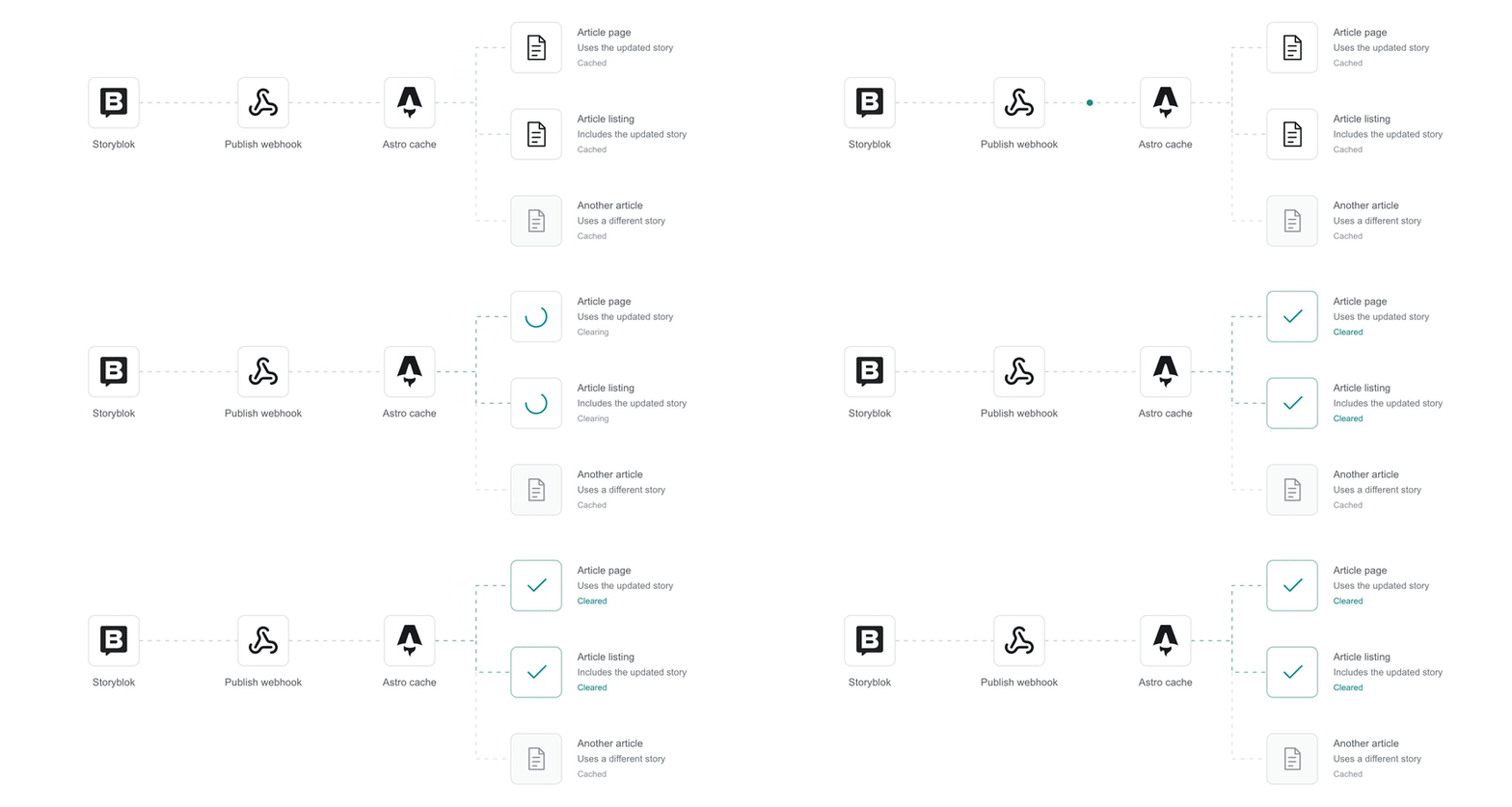
Only pages that use the updated story clear their cached HTML and render again on their next request.
Prerequisites
The implementation requires the following tools and access:
- Astro 7 and Storyblok Astro SDK 10.
- A supported Node.js long-term support release, version 22.12 or newer.
- A Storyblok space and a Content Delivery API access token that uses the default cache lifetime.
- A Storyblok plan that supports webhook secrets.
The implementation builds on the Astro core blueprint, which already includes the Storyblok SDK, component registration, and catch-all route. Follow Integrate Astro with Storyblok to create a connected blueprint project, then open its local checkout and install its dependencies:
npm installThe example uses Astro 7.3.5, Astro SDK 10.3.2, and the Node adapter so you can test caching locally.
Identify the pages that use a story
The endpoint needs to clear every page that uses the changed story. For this example, an article’s title appears on its detail page and in the listing, so both responses need invalidation when the title changes.
To let the endpoint identify those pages from a webhook event, attach cache tags to their responses. A cache tag is a label that identifies the content a page depends on, and Astro can invalidate every response with a matching tag. For this example, give each article a tag with its story ID and give the listing a shared tag:
Response | Cache tag | Changes that affect the response |
|---|---|---|
Article page |
| Updates to the article’s published content |
Article listing |
| Updates to article titles or listing membership |
Another article page | Its own story tag | Updates to that article’s published content |
The endpoint uses the story ID from the webhook payload to clear the article’s cached response, along with article-list so the listing can pick up the updated title too.
Prepare Storyblok
Create an article content type with a title for the page and listing, plus a summary for the detail page:
Field | Type | Purpose |
|---|---|---|
| Text | Heading on the article page and label in the listing |
| Text | Introduction below the article heading |
Create two stories in an articles folder, with first and second as their slugs. Enter a title and summary for each story and publish both. The content requests use the full slugs, articles/first and articles/second.
Use the token already configured for the blueprint under Settings → Access Tokens. Retain the blueprint’s Preview token for its existing draft routes, or use a Public token in a deployment that only serves published content. The article routes below always request published stories. Add the folder, space ID, and webhook secret to the project’s .env file:
STORYBLOK_DELIVERY_API_TOKEN=your-access-token
STORYBLOK_REGION=eu
STORYBLOK_ARTICLES_FOLDER=articles
STORYBLOK_SPACE_ID=your-space-id
STORYBLOK_WEBHOOK_SECRET=your-webhook-secret
If your space already uses the articles slug, choose another folder and set STORYBLOK_ARTICLES_FOLDER to that folder’s slug. The website paths stay under /articles/.
Set STORYBLOK_REGION to match your space: eu, us, ca, ap, or cn. The configuration below also preserves STORYBLOK_API_BASE_URL when the blueprint supplies it.
Generate the webhook secret with openssl rand -hex 20. The SDK reads its token and region when Astro builds the application; the server reads the folder, space ID, and webhook secret at startup.
Configure Astro
In the blueprint project, install the versions used by the companion and add the Node adapter:
npm install astro@7.3.5 @storyblok/astro@10.3.2 @astrojs/node@11.1.6Add a start entry to the existing scripts in package.json so you can run the built server with .env loaded:
"build": "astro build",
"start": "node --env-file=.env dist/server/entry.mjs",
"preview": "astro preview",
Update astro.config.mjs to use the Node adapter and memory cache provider. Keep the blueprint’s existing Storyblok components and register the article component you create next:
import { defineConfig, memoryCache } from 'astro/config';
import node from '@astrojs/node';
import { storyblok } from '@storyblok/astro';
import { loadEnv } from 'vite';

const env = loadEnv(import.meta.env.MODE, process.cwd(), 'STORYBLOK_');

export default defineConfig({
  output: 'server',
  adapter: node({ mode: 'standalone' }),
  cache: { provider: memoryCache() },
  integrations: [
    storyblok({
      accessToken: env.STORYBLOK_DELIVERY_API_TOKEN,
      apiOptions: {
        region: env.STORYBLOK_REGION || 'eu',
        endpoint: env.STORYBLOK_API_BASE_URL
          ? `${new URL(env.STORYBLOK_API_BASE_URL).origin}/v2`
          : undefined,
        timeout: 10,
        cache: { type: 'none', cv: 'manual' },
      },
      components: {
        page: 'storyblok/Page',
        grid: 'storyblok/Grid',
        feature: 'storyblok/Feature',
        teaser: 'storyblok/Teaser',
        article: 'storyblok/Article',
      },
    }),
  ],
});
output: 'server' makes routes render on demand, and memoryCache() stores their HTML in the Node process. The SDK’s cache: { type: 'none', cv: 'manual' } makes content requests without reusing client responses or attaching a previously tracked cache version, so each route cache miss fetches content again.
The configuration uses loadEnv() because the SDK initializes during the build, before the server’s startup command loads .env.
Add 500.astro to handle failed content requests without routing the error through the blueprint’s catch-all page. Keep the error response uncached so another request can retry:
---
Astro.cache.set(false);
Astro.response.headers.set('Cache-Control', 'no-store');
---
<html lang="en">
  <head><meta charset="utf-8" /><title>Content unavailable</title></head>
  <body><h1>Content unavailable</h1><p>Try again later.</p></body>
</html>
Add caching to the article pages
Create /articles/[slug] and /articles/ to fetch published stories and tag their responses. Both routes use a shared helper so they request content with the same folder and cache settings.
Fetch published content
Put the content requests in a shared helper and use useStoryblokApi() to access the client already configured by the Astro SDK. getArticle() retrieves a detail page, and getArticles() retrieves the listing:
import { useStoryblokApi } from '@storyblok/astro';

export const articleFolder = process.env.STORYBLOK_ARTICLES_FOLDER || 'articles';
const articleSlug = /^[a-z0-9]+(?:-[a-z0-9]+)*$/;
export const isArticleSlug = (value) =>
  typeof value === 'string' &&
  value.startsWith(`${articleFolder}/`) &&
  articleSlug.test(value.slice(articleFolder.length + 1));
export const storyTag = (id) => `story:${id}`;
export const listingTag = 'article-list';

export async function getArticle(fullSlug) {
  if (!isArticleSlug(fullSlug)) return null;
  try {
    const { data } = await useStoryblokApi().get(`cdn/stories/${fullSlug}`, {
      version: 'published',
    });
    return data.story;
  } catch (error) {
    if (error.status === 404) return null;
    throw error;
  }
}

export async function getArticles() {
  const { data } = await useStoryblokApi().get('cdn/stories', {
    version: 'published',
    starts_with: `${articleFolder}/`,
    per_page: 100,
  });
  return data.stories.filter((story) => isArticleSlug(story.full_slug));
}
Both requests use version: 'published' so visitors receive published content while editors work on drafts. Storyblok resolves the latest available cache version because the SDK leaves cv out of these requests.
Render the article content
Create src/storyblok/Article.astro to render the content type registered in the configuration. The blueprint’s StoryblokComponent selects this component when a story has article as its content type:
---
import { storyblokEditable } from '@storyblok/astro';

const { blok } = Astro.props;
---
<article {...storyblokEditable(blok)}>
  <h1>{blok.title}</h1>
  <p>{blok.summary}</p>
</article>
Add the article route
Fetch the article in [slug].astro and tag the response with its story ID. Set a five-minute lifetime so the page can reuse its HTML between updates:
---
import StoryblokComponent from '@storyblok/astro/StoryblokComponent.astro';
import { articleFolder, getArticle, storyTag } from '../../lib/storyblok.js';

const story = await getArticle(`${articleFolder}/${Astro.params.slug}`);
Astro.response.headers.set('Cache-Control', 'no-store');
if (story) {
  Astro.cache.set({ maxAge: 300, tags: [storyTag(story.id)] });
} else {
  Astro.cache.set(false);
  Astro.response.status = 404;
}
const renderedAt = new Date().toISOString();
---
<html lang="en">
  <head>
    <meta charset="utf-8" />
    <title>{story?.content.title || 'Article not found'}</title>
  </head>
  <body>
    <a href="/articles/">All articles</a>
    {story ? <StoryblokComponent blok={story.content} /> : <h1>Article not found</h1>}
    <small>Rendered at <time>{renderedAt}</time></small>
  </body>
</html>
```

Astro can reuse the response for up to five minutes unless the endpoint clears it sooner. The route leaves a missing story’s `404` response uncached so a later request can retrieve the article once it’s published.

Compare the render timestamp across repeated requests to check whether Astro reuses the HTML. Since the `no-store` header keeps the browser from caching the response, an unchanged timestamp shows that Astro’s memory provider reused it according to `Astro.cache.set()`.

### Add the article listing

The article’s title also appears in the listing, so the listing needs invalidation whenever an editor changes that title. Apply `article-list` to its response so the endpoint can clear both pages:

```astro title="src/pages/articles/index.astro"
---
import { articleFolder, getArticles, listingTag } from '../../lib/storyblok.js';

const stories = await getArticles();
Astro.response.headers.set('Cache-Control', 'no-store');
Astro.cache.set({ maxAge: 300, tags: [listingTag] });
const renderedAt = new Date().toISOString();
---
<html lang="en">
  <head>
    <meta charset="utf-8" />
    <title>Articles</title>
  </head>
  <body>
    <h1>Articles</h1>
    <ul>
      {stories.map((story) => (
        <li><a href={`/articles/${story.full_slug.slice(articleFolder.length + 1)}`}>{story.content.title}</a></li>
      ))}
    </ul>
    <small>Rendered at <time>{renderedAt}</time></small>
  </body>
</html>
Astro can reuse the response for up to five minutes unless the endpoint clears it sooner. The route leaves a missing story’s 404 response uncached so a later request can retrieve the article once it’s published.
Compare the render timestamp across repeated requests to check whether Astro reuses the HTML. Since the no-store header keeps the browser from caching the response, an unchanged timestamp shows that Astro’s memory provider reused it according to Astro.cache.set().
Add the article listing
The article’s title also appears in the listing, so the listing needs invalidation whenever an editor changes that title. Apply article-list to its response so the endpoint can clear both pages:
---
import { articleFolder, getArticles, listingTag } from '../../lib/storyblok.js';

const stories = await getArticles();
Astro.response.headers.set('Cache-Control', 'no-store');
Astro.cache.set({ maxAge: 300, tags: [listingTag] });
const renderedAt = new Date().toISOString();
---
<html lang="en">
  <head>
    <meta charset="utf-8" />
    <title>Articles</title>
  </head>
  <body>
    <h1>Articles</h1>
    <ul>
      {stories.map((story) => (
        <li><a href={`/articles/${story.full_slug.slice(articleFolder.length + 1)}`}>{story.content.title}</a></li>
      ))}
    </ul>
    <small>Rendered at <time>{renderedAt}</time></small>
  </body>
</html>
Clearing article-list also lets the listing include newly published articles on its next render, even when those stories have no cached detail pages yet.
Create the webhook endpoint
Create /api/storyblok to receive Storyblok’s publish webhooks and clear the tagged responses through Astro’s route caching API. Before clearing the cache, verify that the request comes from your space and carries a valid signature made with your webhook secret:
import { createHmac, timingSafeEqual } from 'node:crypto';
import { isArticleSlug, listingTag, storyTag } from '../../lib/storyblok.js';

export async function POST({ request, cache }) {
  cache.set(false);
  const json = (body, status = 200) =>
    Response.json(body, {
      status,
      headers: { 'Cache-Control': 'no-store' },
    });
  const secret = process.env.STORYBLOK_WEBHOOK_SECRET;
  const spaceId = process.env.STORYBLOK_SPACE_ID;
  if (!secret || !spaceId || !cache.enabled) {
    return json({ error: 'Webhook or cache is not configured' }, 503);
  }

  const body = Buffer.from(await request.arrayBuffer());
  const signature = request.headers.get('webhook-signature') || '';
  if (!/^[a-f0-9]{40}$/i.test(signature)) {
    return json({ error: 'Invalid signature' }, 401);
  }
  const expected = createHmac('sha1', secret).update(body).digest();
  if (!timingSafeEqual(expected, Buffer.from(signature, 'hex'))) {
    return json({ error: 'Invalid signature' }, 401);
  }

  let event;
  try {
    event = JSON.parse(body.toString('utf8'));
  } catch {
    return json({ error: 'Invalid JSON' }, 400);
  }
  if (!event || typeof event !== 'object' || String(event.space_id) !== spaceId) {
    return json({ error: 'Unexpected space' }, 403);
  }
  if (!['published', 'unpublished', 'deleted'].includes(event.action)) {
    return json({ ignored: true });
  }
  if (
    !Number.isSafeInteger(event.story_id) ||
    event.story_id <= 0 ||
    typeof event.full_slug !== 'string'
  ) {
    return json({ error: 'Invalid story event' }, 400);
  }
  if (!isArticleSlug(event.full_slug)) return json({ ignored: true });

  const tags = [storyTag(event.story_id), listingTag];
  try {
    await cache.invalidate({ tags });
    return json({ invalidated: tags });
  } catch {
    console.error('Storyblok route invalidation failed');
    return json({ error: 'Invalidation failed' }, 500);
  }
}
Storyblok signs the raw request body with HMAC-SHA1. Because parsing and reserializing JSON can change those bytes, the endpoint verifies the original body and compares signatures with timingSafeEqual(). The Storyblok webhook signature tutorial explains the verification process.
Once the endpoint validates the event, it waits for cache.invalidate() to clear the existing tagged entries before returning a success response. The endpoint uses the same tags when an editor unpublishes or deletes an article, since removing it affects both its page and its listing entry.
Configure the Storyblok webhook
To connect publication to this endpoint, give Storyblok a public HTTPS URL for the Node server. Deploy the application or expose its built server through a tunnel, and create a webhook under Settings → Webhooks with the endpoint URL:
https://your-server.example/api/storyblokUse the secret stored in STORYBLOK_WEBHOOK_SECRET. Select Story published, Story unpublished, and Story deleted as the triggers. The endpoint handles their published, unpublished, and deleted actions.
Inspect requests in the webhook’s delivery logs to check the response status and payload. Refer to the Storyblok webhook documentation for the configuration options.
Check the published update
Astro enables caching in the built application. With .env configured, build the project and start the server. The start script defined earlier loads .env and runs the Node adapter’s built entry point:
npm run build
npm start
Request /articles/ and both article pages to populate their caches. Inspect the first article’s response headers with the following command:
curl --include http://localhost:4321/articles/firstThe first render reports X-Astro-Cache: MISS. Repeating the request should return HIT with the same timestamp, confirming that Astro reused the rendered HTML.
With the cache populated, publish a different title for the first article and wait for a successful response in the webhook’s delivery log. The Content Delivery API can expose the change before the webhook reaches your server, while Astro continues to return the cached HTML. Request the article and listing again to check whether publication cleared their responses. Both should report a cache miss and include the updated title once the Content Delivery API serves the change. The second article should remain a hit with its original timestamp.
To check removal, unpublish the first article and wait for successful webhook delivery. Once the API also reflects the change, its URL should return 404 and the listing should omit its title.
Account for the limitations
The example uses a single Node process, one language, and a five-minute route cache lifetime. Check the following constraints before extending it to your own site.
Account for delayed content
Astro caches rendered HTML, while Storyblok’s Content Delivery API has its own cache. Keep the access token’s default cache lifetime so a custom lifetime doesn’t delay content updates.
A successful webhook response confirms that your endpoint cleared the tagged cache entries. The Content Delivery API may still serve the earlier content for a few seconds after publication, as described in Storyblok’s caching documentation. If a visitor requests the page during that interval, Astro can cache the earlier copy again for another five minutes. The same timing issue applies to unpublication and deletion.
A render already in progress can also finish after invalidation and put an earlier response back into memory, since clearing the cache doesn’t cancel that render.
Use this example when your site can accept the five-minute cache lifetime as a fallback. For stricter freshness requirements, coordinate invalidation with the expected published revision, prevent older renders from refilling the cache, and persist failed work for retries. A fixed delay alone cannot confirm that the content is ready.
Storyblok doesn’t retry failed webhook requests, so monitor failures and replay the invalidation when needed. The five-minute route lifetime provides a fallback if an event is missed.
Choose a cache provider for deployment
The memory cache belongs to one Node process and disappears on restart. For multiple instances, choose a shared cache or content delivery network provider and check its invalidation behavior so a webhook request can clear responses across instances.
Keep draft previews in a separate, uncached route or deployment. The routes in this example always fetch published content and cache their HTML, including when the SDK has a Preview token.
Extend the dependency mapping
The endpoint handles publication, unpublication, and deletion for articles in the configured folder. It ignores moved events, so moving a story into or out of that folder can leave the listing or an earlier URL cached until the response expires. To handle moves, account for both full_slug and old_full_slug from the event.
The example also doesn’t track shared navigation, authors, or stories fetched through resolve_relations or resolve_links. Tag each response with the IDs of the stories whose content it uses, and extend the endpoint to invalidate those tags when the referenced stories change. The current folder filter ignores events outside the article folder, so adding tags alone is insufficient.
The listing fetches up to 100 stories in one language and accepts one slug segment under the chosen folder. Add pagination for a larger listing and adapt the slug validation for nested folders or localized routes.
Apply this to your project
Use the companion repository as a reference, or give the prompt below to your coding agent. Enter the pages you want to cache, such as product pages and category listings:
Use https://github.com/ivancernja/storyblok-astro-route-caching as a reference to add Astro route caching to [pages or routes] in my Storyblok project. Refresh the affected pages through Storyblok publish webhooks and follow this project's existing conventions.In an existing @storyblok/astro project, keep its component registration and rendering, reuse useStoryblokApi() in the content helper, and apply the cache settings to its configured client. Map each route to the stories it uses, including shared or resolved content, then extend the endpoint’s event handling to invalidate those tags.
Check that publishing or removing content updates the dependent pages while unrelated routes remain cached. Use the adapter and cache provider for your deployment when moving beyond the local Node example.
Questions or Feedback?
Join our Discord (opens in a new window)Author