Automate Storyblok deploys to S3 and CloudFront with GitHub Actions
Storyblok is the first headless CMS that works for developers & marketers alike.
This is part 2 in a series on deploying a static Storyblok-powered website to AWS with S3 and CloudFront. In part 1, Automate Storyblok deploys to S3 and CloudFront with GitHub Actions, we designed and built the hosting architecture with OpenTofu. If you have not read that yet, start there first. Here is where we landed:
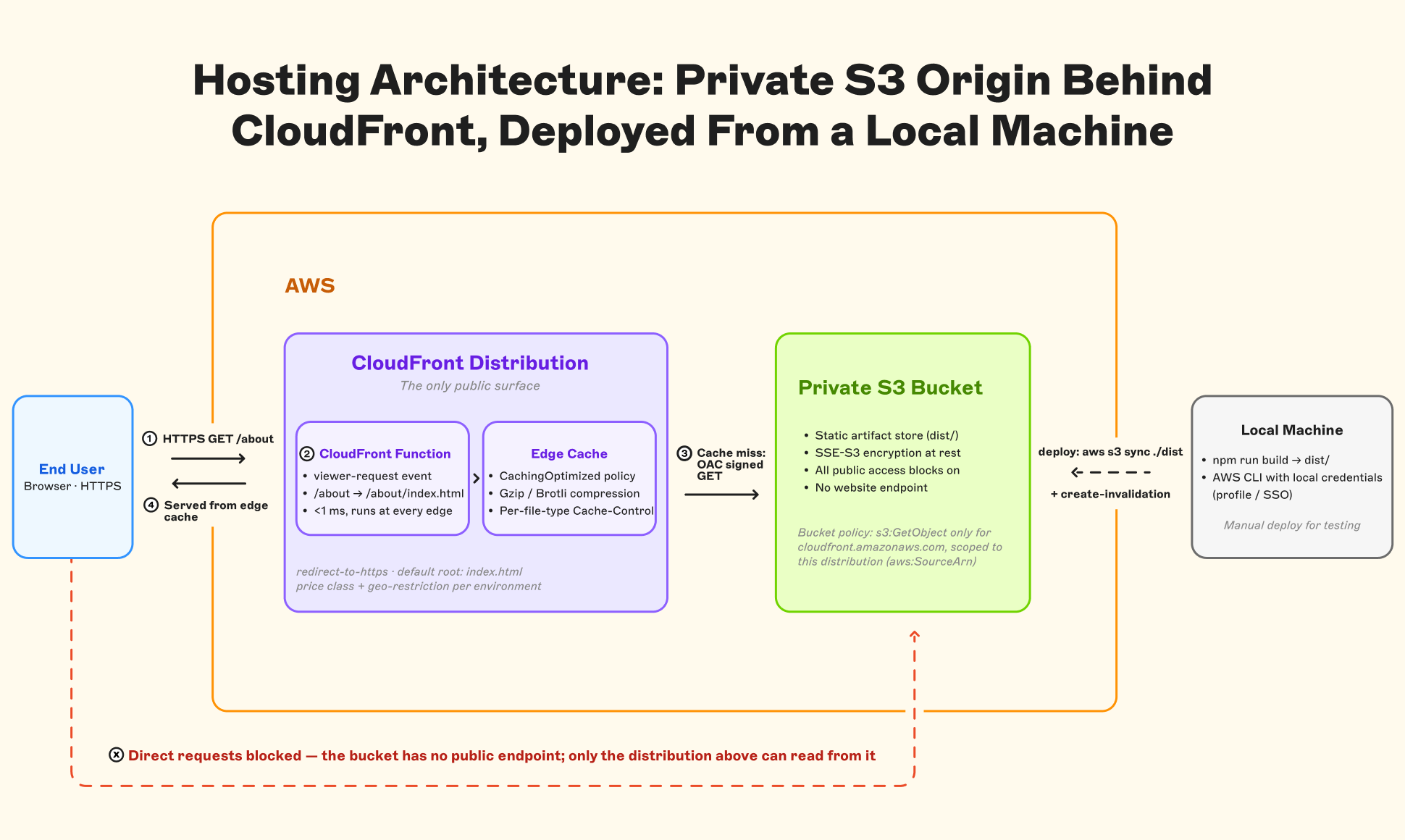
The setup works, but it still leaves one big manual step. Every production change requires someone to build the site locally, then sync the generated artifacts to S3. That might be fine for a small single-developer project, but it does not scale once more people are contributing. Local environments drift, build output becomes harder to trust, and deployments depend too much on whoever happens to run the command.
To address this and make the project easier to scale, we will automate deployment with GitHub Actions.
The goals of what we will build are:
- Run builds in a predictable, reproducible environment.
- Apply security best practices, especially for AWS access and tokens.
- Handle both website deployments and infrastructure changes through the pipeline.
Part 1: GitHub Actions with OIDC (no stored AWS keys)
This is the part that makes security teams happy. Traditional CI setups store long-lived AWS access keys as repository secrets. Those keys never expire, need to be manually rotated, and are a single point of compromise should they be exposed. OIDC eliminates all of that.
Setting up the OIDC provider and IAM role
Before the workflow can assume a role, AWS needs to trust GitHub as an identity provider. Under the hood, the exchange works like this:
- GitHub Actions mints a short-lived JSON Web Token (JWT) for each workflow run. The token includes claims about the repository, branch, and workflow.
- The workflow presents this JWT to AWS STS (Security Token Service) and requests temporary credentials.
- AWS validates the JWT against a pre-configured OIDC identity provider and IAM role trust policy. If the claims match (correct repo, correct branch), STS issues temporary credentials that can be configured to expire in as little as 1 hour.
- The workflow uses those temporary credentials for all AWS operations.
The OIDC provider is a one-time manual setup per AWS account (create it in IAM with URL https://token.actions.githubusercontent.com and audience sts.amazonaws.com). We construct the provider ARN and subject claim as locals:
data "aws_caller_identity" "current" {}

locals {
  oidc_provider_arn = "arn:aws:iam::${data.aws_caller_identity.current.account_id}:oidc-provider/token.actions.githubusercontent.com"
  oidc_sub_claim    = "repo:${var.github_repository}:ref:refs/heads/main"
}
The sub claim condition locks role assumption to a specific repository and branch. Without it, any GitHub Actions workflow in any public repository could assume your role.
The deploy role uses a shared trust policy and gets least-privilege permissions for S3 sync and CloudFront invalidation:
data "aws_iam_policy_document" "github_oidc_trust" {
  statement {
    effect = "Allow"
    principals {
      type        = "Federated"
      identifiers = [local.oidc_provider_arn]
    }
    actions = ["sts:AssumeRoleWithWebIdentity"]
    condition {
      test     = "StringEquals"
      variable = "token.actions.githubusercontent.com:aud"
      values   = ["sts.amazonaws.com"]
    }
    condition {
      test     = "StringEquals"
      variable = "token.actions.githubusercontent.com:sub"
      values   = [local.oidc_sub_claim]
    }
  }
}

resource "aws_iam_role" "github_deploy" {
  name               = "${var.project_name}-github-deploy"
  assume_role_policy = data.aws_iam_policy_document.github_oidc_trust.json
}

data "aws_iam_policy_document" "github_deploy" {
  statement {
    sid    = "TerraformStateRead"
    effect = "Allow"
    actions = [
      "s3:GetObject",
      "s3:ListBucket"
    ]
    resources = [
      "arn:aws:s3:::terraform-state",
      "arn:aws:s3:::terraform-state/${var.project_name}/*"
    ]
  }

  statement {
    sid    = "SiteBucketSync"
    effect = "Allow"
    actions = [
      "s3:PutObject",
      "s3:GetObject",
      "s3:DeleteObject",
      "s3:ListBucket"
    ]
    resources = [
      aws_s3_bucket.site.arn,
      "${aws_s3_bucket.site.arn}/*"
    ]
  }

  statement {
    sid       = "CloudFrontInvalidation"
    effect    = "Allow"
    actions   = ["cloudfront:CreateInvalidation"]
    resources = [aws_cloudfront_distribution.site.arn]
  }
}

resource "aws_iam_role_policy" "github_deploy" {
  name   = "deploy"
  role   = aws_iam_role.github_deploy.id
  policy = data.aws_iam_policy_document.github_deploy.json
}
Putting it together: the deploy workflow
GitHub mints an OIDC token → configure-aws-credentials exchanges it for temporary credentials via the deploy role ARN → those credentials authorize s3 sync to the site bucket and cloudfront create-invalidation on the distribution
name: Deploy Site

on:
  push:
    branches: [main]
    paths-ignore:
      - "infra/**"
  workflow_dispatch:

permissions:
  contents: read
  id-token: write

env:
  TF_VAR_aws_region: ${{ secrets.AWS_REGION }}
  TF_VAR_github_repository: ${{ github.repository }}

jobs:
  deploy:
    runs-on: ubuntu-latest
    steps:
      - uses: actions/checkout@v4

      - uses: actions/setup-node@v4
        with:
          node-version: "lts/*"
          cache: npm

      - run: npm ci

      - name: Build
        run: npm run build
        env:
          STORYBLOK_DELIVERY_API_TOKEN: $ secrets.STORYBLOK_DELIVERY_API_TOKEN

      - name: Setup OpenTofu
        uses: opentofu/setup-opentofu@v1

      - name: Configure AWS credentials (OIDC)
        uses: aws-actions/configure-aws-credentials@v4
        with:
          role-to-assume: $ secrets.AWS_DEPLOY_ROLE_ARN
          aws-region: eu-west-1

      - name: Init (state access)
        working-directory: infra
        run: tofu init

      - name: Export infrastructure outputs
        working-directory: infra
        run: |
          echo "SITE_BUCKET_NAME=$(tofu output -raw site_bucket_name)" >> "$GITHUB_ENV"
          echo "CLOUDFRONT_DISTRIBUTION_ID=$(tofu output -raw cloudfront_distribution_id)" >> "$GITHUB_ENV"

      - name: Sync to S3
        run: |
          aws s3 sync ./dist "s3://${SITE_BUCKET_NAME}"  \
            --delete \
            --cache-control "public, max-age=300"

      - name: Invalidate CloudFront
        run: |
          aws cloudfront create-invalidation \
            --distribution-id "${CLOUDFRONT_DISTRIBUTION_ID}"  \
            --paths "/*"
A few design decisions baked are into this workflow:
on: push: branches: [main]This workflow will run whenever code changes are pushed into themainbranch. This is what allows us to automate the deployments whenever we accept and merge in a PR.- **
paths-ignore: ["infra/**"]: Changes to infrastructure files shouldn’t trigger a content deploy. Infrastructure changes get their own workflow (we’ll cover this in a second). permissions: id-token: write: This is required for the OIDC token exchange. Without it, theconfigure-aws-credentialsaction can’t request a JWT from GitHub. If you forget this, everything fails. For implementation details, see the aws-actions/configure-aws-credentials repo and GitHub’s OIDC security hardening guide.- Dynamic output reading: The deploy workflow reads the bucket name and distribution ID from
tofu outputfrom our setup we built previously rather than hardcoding them as secrets. This keeps infrastructure and deployment loosely coupled through state. - Secrets are limited to three values:
STORYBLOK_DELIVERY_API_TOKEN,AWS_DEPLOY_ROLE_ARN, andAWS_REGION. Notice what’s missing: no AWS access keys. As mentioned above, the OIDC exchange handles authentication at runtime, so there are no long-lived credentials to store, rotate, or worry about leaking. Every set of credentials the workflow receives expires within the hour. The result is no stored secrets, no rotation burden, full CloudTrail auditability on every credential issuance. It’s a much cleaner model.
The infrastructure workflow (separate)
The deploy workflow is scoped to content changes with a narrow blast radius. Infrastructure changes carry more risk, so they get their own guardrails: a separate workflow with a manual trigger, a dedicated IAM role, and a validate-then-plan-then-apply sequence that forces the changes to be validated before anything runs:
name: Infrastructure

on:
  workflow_dispatch:

permissions:
  contents: read
  id-token: write

env:
  TF_VAR_aws_region: ${{ secrets.AWS_REGION }}
  TF_VAR_github_repository: ${{ github.repository }}

jobs:
  validate:
    runs-on: ubuntu-latest
    steps:
      - uses: actions/checkout@v4

      - uses: opentofu/setup-opentofu@v1

      - name: Format check
        working-directory: infra
        run: tofu fmt -check -recursive

      - name: Init (no backend)
        working-directory: infra
        run: tofu init -backend=false

      - name: Validate
        working-directory: infra
        run: tofu validate

  apply:
    if: github.ref == 'refs/heads/main'
    runs-on: ubuntu-latest
    needs: validate
    steps:
      - uses: actions/checkout@v4

      - uses: opentofu/setup-opentofu@v1

      - name: Configure AWS credentials (OIDC)
        uses: aws-actions/configure-aws-credentials@v4
        with:
          role-to-assume: $ secrets.AWS_INFRA_ROLE_ARN
          aws-region: ${{ secrets.AWS_REGION }}

      - name: Init
        working-directory: infra
        run: tofu init

      - name: Plan
        working-directory: infra
        run: tofu plan -input=false -out=tfplan

      - name: Apply
        working-directory: infra
        run: tofu apply -auto-approve tfplan
This workflow uses the same OIDC trust pattern as the deploy workflow but assumes a different IAM role (AWS_INFRA_ROLE_ARN) with a broader policy: full S3, CloudFront, and IAM management permissions. The deploy role can’t touch infrastructure. The infra role can’t be assumed by automated pushes, only by manual triggers from a team member. That separation is important because it means a content deployment can never escalate into an infrastructure change. You can review the full IAM policy for both roles in the demo repository.
Part 2: OpenTofu state management
So far we’ve been using local state, which is fine for getting started. But for a real project that we want to deploy from CI, OpenTofu state needs to live in a shared, locked backend. The standard AWS pattern is an S3 bucket for state and a DynamoDB table for locking. That means our backend setup from earlier needs to change into something like this:
terraform {
  backend "s3" {
    bucket         = "terraform-state"
    key            = "s3-webinar-demo/infra.tfstate"
    region         = "eu-west-1"
    encrypt        = true
    dynamodb_table = "terraform-locks"
  }
}The state bucket and DynamoDB table must exist before you run tofu init. Create them once, manually or with a small script:
aws s3api create-bucket \
  --bucket terraform-state \
  --region eu-west-1 \
  --create-bucket-configuration LocationConstraint=eu-west-1

aws dynamodb create-table \
  --table-name terraform-locks \
  --attribute-definitions AttributeName=LockID,AttributeType=S \
  --key-schema AttributeName=LockID,KeyType=HASH \
  --billing-mode PAY_PER_REQUEST
Think of state as the contract between your workflows. The infra workflow writes state (creates and modifies resources). The deploy workflow reads state (queries tofu output to discover the bucket name and distribution ID, which is what our deploy workflow does). This is the more dynamic approach and requires the deploy role to have read access to the state bucket.
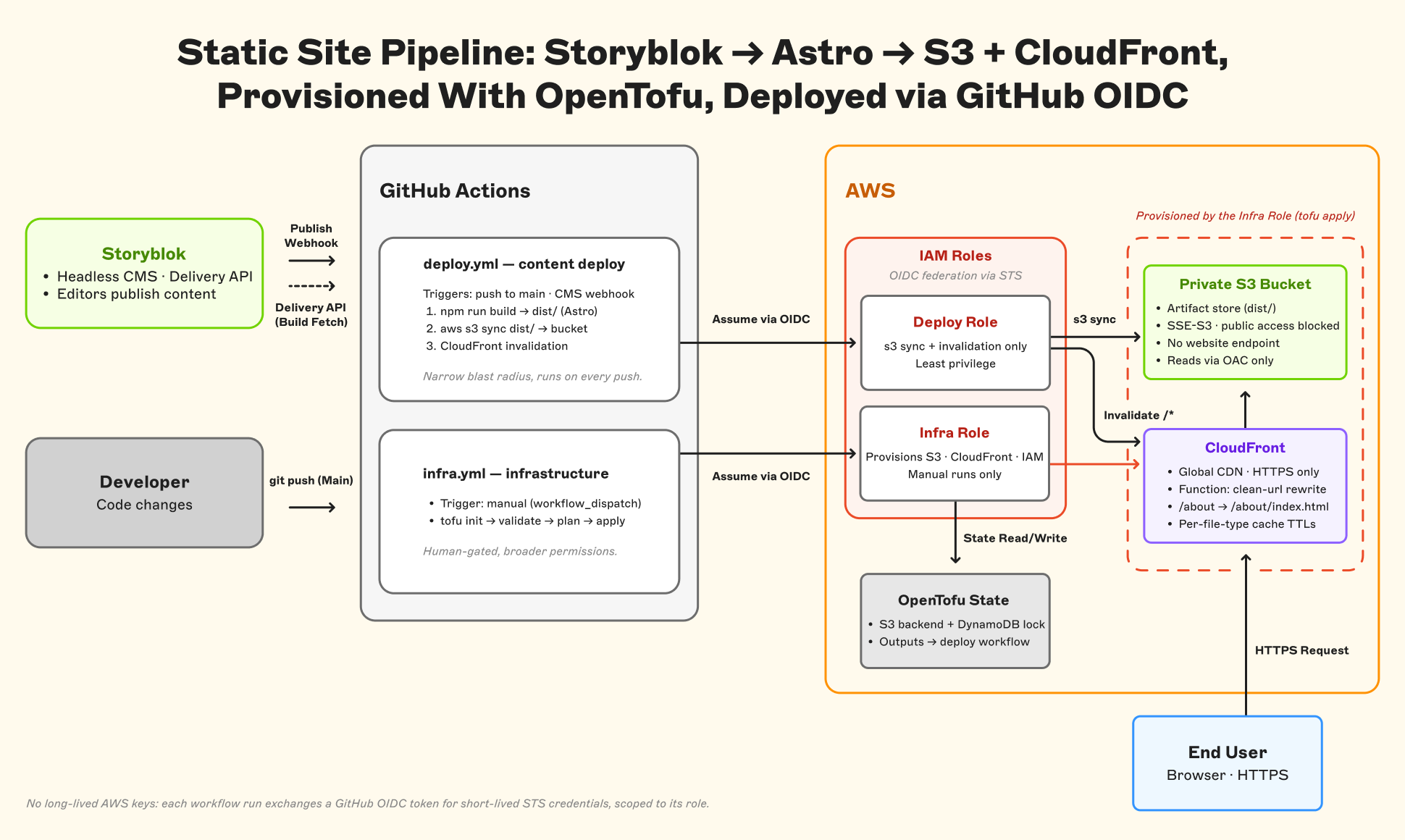
At this point the deployment workflows we built now look like this.
Part 3: Cache strategy, a deeper look
That --cache-control "public, max-age=300" flag we used earlier? It works, but it’s a blunt instrument. It leaves performance on the table for static assets and creates unnecessary revalidation traffic for content that hasn’t changed.
Here’s how Cache-Control flows through a request: when s3 sync uploads an object, the --cache-control flag is stored as Cache-Control metadata on the S3 object. When CloudFront fetches that object from S3, S3 returns the metadata as an HTTP response header. CloudFront then uses that header to determine how long to cache the response at the edge, bounded by the cache policy’s Minimum, Default, and Maximum TTL settings. Browsers also use the same Cache-Control response header for their local cache. So the value you set during upload influences caching behavior at each layer, from S3 to the CDN edge to the end user’s browser.
A smarter strategy for our project applies different headers per file type:
- HTML files: Short TTL (e.g.,
max-age=300ormax-age=60). HTML pages are the entry points to your site and the first thing that changes when content is updated in Storyblok. A short TTL means users see new content within minutes without waiting for a manual cache invalidation. - Hashed assets (JS, CSS, images with content hashes in the filename): Long TTL with
immutable(e.g.,max-age=31536000, immutable). Build tools like Astro embed a content hash in the filename, so when the file’s content changes, the filename changes too. That means a cached version is always correct for its URL. Settingimmutabletells browsers and CDN edges to skip revalidation entirely, eliminating unnecessary round-trips and saving bandwidth.
You can implement this in the deploy step by running two s3 sync commands during deploy:
# HTML files: short cache
aws s3 sync ./dist s3://$BUCKET --delete \
  --cache-control "public, max-age=300" \
  --exclude "*" --include "*.html"

# Everything else: long cache
aws s3 sync ./dist s3://$BUCKET \
  --cache-control "public, max-age=31536000, immutable" \
  --exclude "*.html"
If you want even more control, you can replace the managed CachingOptimized policy in CloudFront with a custom cache policy that varies TTLs by path pattern (e.g., /_astro/* for hashed assets vs. *.html for pages). But the two-sync approach above gets you 90% of the way there with zero extra infrastructure configurations.
Part 4: Closing the loop with webhook rebuilds and ISR-style content refresh
Everything up to this point assumes you’re triggering deploys manually or on code push. But in a Storyblok-driven workflow, content changes also happen in Storyblok, not just in the repository. To close the loop, you need the CMS to trigger the pipeline automatically.
Webhook-triggered rebuilds are the best practice approach. Configure a Storyblok webhook to fire on Story publish events, sending a request to an endpoint you control. That endpoint can then trigger your GitHub Actions deploy workflow, for example by creating a repository_dispatch event against the repo. When an editor publishes a story, Storyblok sends the webhook, GitHub kicks off the build, and the site is live with the new content within minutes. Editors never leave the CMS and the feedback loop stays tight.
FlowMotion can handle this handoff for you by listening for Storyblok publish webhooks and triggering the GitHub Actions build automatically 🙂.
For sites with hundreds or thousands of pages, a full rebuild on every publish can start to feel slow. One way to solve this is with ISR-style rendering, where pages are generated or refreshed individually instead of rebuilding the whole site. Astro can support this kind of behavior on platforms that provide it, such as Vercel’s ISR support through the Astro Vercel adapter. But in the pure static S3 + CloudFront setup we’re building here, there is no server runtime to regenerate pages on demand because you are still deploying prebuilt files. The closest approximation is to rebuild only the affected routes in your own pipeline, upload those generated files to S3, and invalidate only the changed CloudFront paths.
Remember, most modern frameworks store assets in a hashed directory name, so if you run a build for one or two routes and upload the files to S3, only the html and associated assets from that build will be impacted. Then the only time you would need to do a full build is if there is a new version of the underlying code of the project to deploy.
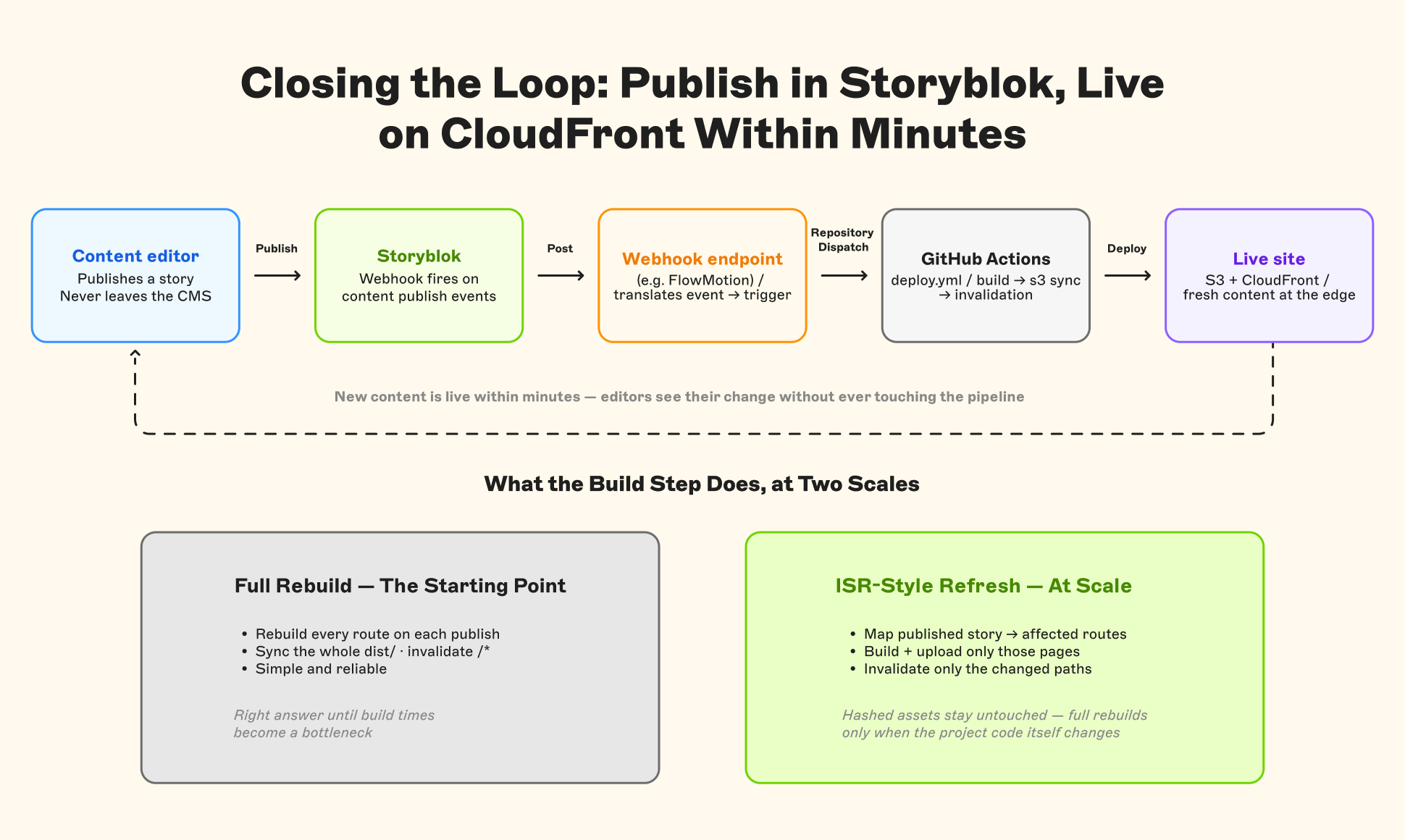
In practice it looks like this:
name: Deploy Changed Routes (ISR-style)

on:
  repository_dispatch:
    types: [storyblok-publish]

permissions:
  contents: read
  id-token: write

env:
  TF_VAR_aws_region: ${{ secrets.AWS_REGION }}
  TF_VAR_github_repository: ${{ github.repository }}

jobs:
  deploy-routes:
    runs-on: ubuntu-latest
    steps:
      - uses: actions/checkout@v4

      - uses: actions/setup-node@v4
        with:
          node-version: "lts/*"
          cache: npm

      - run: npm ci

      # Storyblok publish event, forwarded as-is by the webhook endpoint:
      # client_payload.payload.full_slug = "marketing-articles/home-2"
      - name: Resolve route from payload
        id: routes
        run: |
          SLUG="${{ github.event.client_payload.payload.full_slug }}"
          echo "slug=${SLUG}" >> "$GITHUB_OUTPUT"
          echo "path=${SLUG}/*" >> "$GITHUB_OUTPUT"

      - name: Build only the affected route
        run: npm run build
        env:
          ONLY_ROUTES: ${{ steps.routes.outputs.slug }}
          STORYBLOK_DELIVERY_API_TOKEN: ${{ secrets.STORYBLOK_DELIVERY_API_TOKEN }}

      - name: Setup OpenTofu
        uses: opentofu/setup-opentofu@v1

      - name: Configure AWS credentials (OIDC)
        uses: aws-actions/configure-aws-credentials@v4
        with:
          role-to-assume: ${{ secrets.AWS_DEPLOY_ROLE_ARN }}
          aws-region: eu-west-1

      - name: Init (state access)
        working-directory: infra
        run: tofu init

      - name: Export infrastructure outputs
        working-directory: infra
        run: |
          echo "SITE_BUCKET_NAME=$(tofu output -raw site_bucket_name)" >> "$GITHUB_ENV"
          echo "CLOUDFRONT_DISTRIBUTION_ID=$(tofu output -raw cloudfront_distribution_id)" >> "$GITHUB_ENV"

      # no --delete: dist/ holds only the rebuilt route, the rest of the
      # bucket must stay in place
      - name: Upload rebuilt HTML
        run: |
          aws s3 sync ./dist "s3://${SITE_BUCKET_NAME}" \
            --exclude "*" --include "*.html" \
            --cache-control "public, max-age=300"

      - name: Upload any new hashed assets
        run: |
          aws s3 sync ./dist "s3://${SITE_BUCKET_NAME}" \
            --exclude "*.html" \
            --cache-control "public, max-age=31536000, immutable"

      - name: Invalidate only the changed path
        run: |
          aws cloudfront create-invalidation \
            --distribution-id "${CLOUDFRONT_DISTRIBUTION_ID}" \
            --paths "${{ steps.routes.outputs.path }}"
Here is a visualization of our updated workflow handling everything end to end.
For most projects, webhook-triggered full rebuilds are the right starting point. Move to ISR-style approaches when build times become a bottleneck as the project grows.
Part 5: Where to go from here
What we’ve built above is a solid, production-ready baseline. Here’s where you might take it next, roughly ordered by impact:
- Custom domain + TLS: Add a Route 53 hosted zone and an ACM certificate. One thing that trips everyone up is that the certificate must be in
us-east-1regardless of your bucket’s region, because CloudFront is a global service and only reads certificates from that region. - WAF integration: Attach an AWS WAF WebACL to the distribution for rate limiting, bot protection, or geo-blocking at the request level (more granular than CloudFront’s built-in geo-restriction).
- Multi-environment support: Use OpenTofu workspaces or variable files to spin up identical preview and staging environments from the same configuration.
- Selective invalidation: Instead of invalidating
/*on every deploy, compute which files actually changed and invalidate only those paths. Saves money on sites with frequent deploys.
Try it yourself
The full implementation is on GitHub at storyblok/s3-webinar-demo. Clone the repo, set up your Storyblok space and AWS account, and follow the README to deploy the stack end to end. The repository includes every OpenTofu file, both GitHub Actions workflows, and a working Astro + Storyblok integration you can use as a starting point for your own project.
Recap
We started where every static site starts: with a build step. Astro and Storyblok gave us a clean dist/ folder — plain HTML, CSS, and JS — with no runtime attached and no opinions about where it gets hosted. That portability is what makes the rest of the approach work.
To serve that folder, we kept S3 completely private and put CloudFront in front as the only public surface. Origin Access Control locks the bucket to a single distribution, and a lightweight CloudFront Function handles the clean URL rewriting that S3 can’t do on its own. The result is a hosting layer with no public bucket endpoint and no room for accidental misconfiguration.
Deploying into that setup turned out to be two commands: s3 sync to push the build, and a CloudFront invalidation to flush the edge cache. Straightforward enough to run manually, and enough to automate.
So we automated it. GitHub Actions with OIDC means the pipeline authenticates with short-lived credentials instead of stored access keys with no secrets to rotate. Two IAM roles keep the blast radius tight: the deploy role can push files and invalidate the cache, but it can’t touch infrastructure. The infra role can modify resources, but only through a manual trigger. OpenTofu state is the contract between them — the infra workflow writes it, the deploy workflow reads it.
From there, we refined the cache strategy — moving from a single uniform TTL to per-file-type headers that let hashed assets cache indefinitely while HTML stays fresh — and wired up webhook-triggered rebuilds so content editors can publish in Storyblok and see changes go live without ever thinking about the pipeline.
That’s the whole thing. Each piece solves one specific problem, and they compose cleanly because they were designed to stay out of each other’s way. If you’ve been following along, you already have everything you need to get this running. And once it’s running, you’ll find it’s a surprisingly comfortable stack to live with and grow into.
Questions or Feedback?
Join our Discord (opens in a new window)Author