Taxonomies
Your category pages, filters, related content and feeds all run on one thing: how your content is categorized.
So, what if you never had to wonder whether it was done right?
Define your categories centrally, control exactly how they're applied, and trust the data everything downstream is built on.
 | #1 Enterprise Headless CMS
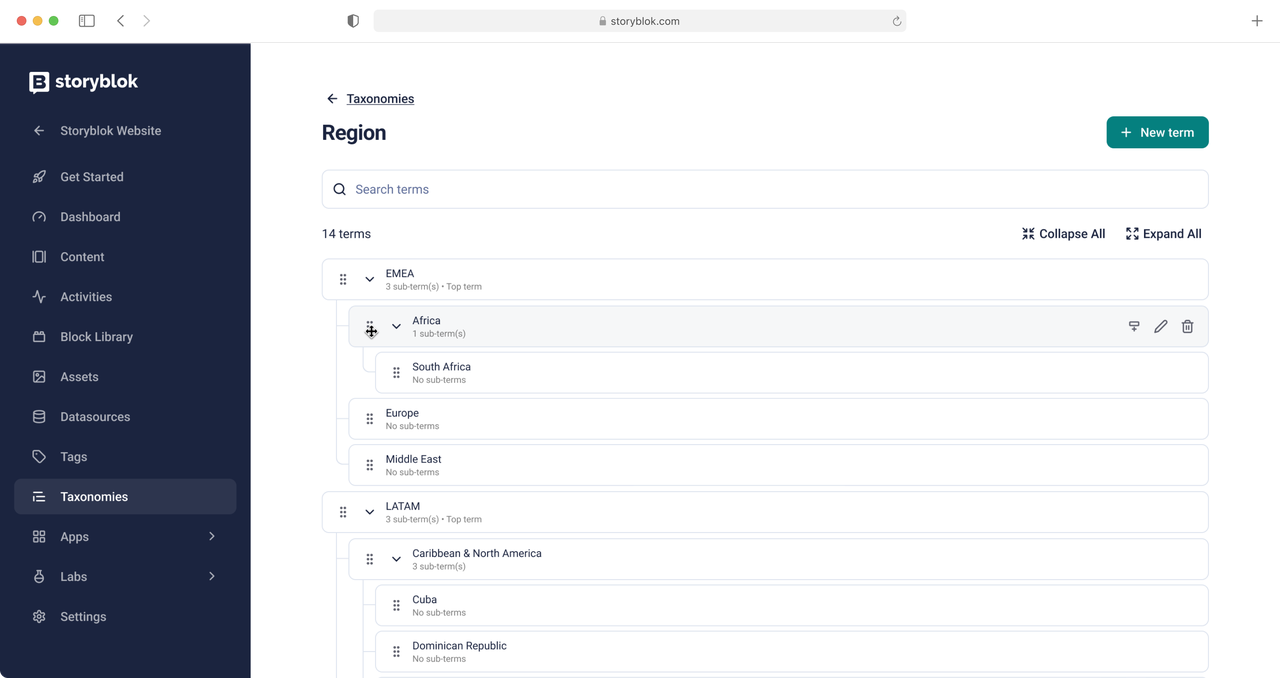
Introducing: Content taxonomies in Storyblok
A content taxonomy is a controlled, hierarchical set of categories used to classify content (product line, region, audience, topic) so it can be filtered, reused, and delivered consistently across channels.
-
Model categories that match your catalog
Build separate vocabularies for region, product line, audience, or material. Nest terms as deep as the domain needs.
-
Separate who defines from who applies
A dedicated permission controls who can create and change the vocabulary.
-
Require categorization before publishing
Mark a taxonomy as required on a content type and stories can’t go live without it, so gaps get caught at authoring time.
-
Constrain the choices per content type
Scope a field to an entire taxonomy, or to any sub-term inside one. Cap how many terms an editor may pick.
-
Filter delivery at any level of the tree
Query the CDN or Management API by taxonomy term and get everything associated with it.
-
Keep control as the vocabulary grows
Search, sort and paginate across thousands of terms. Archive the terms you’ve retired without deleting the history behind them.
What can you do with a content taxonomy in Storyblok?
Three things: build your taxonomy in one place, control how it's applied per content type, and query your content by term through the API.

Taxonomy Manager
One place to create taxonomies and nested terms, with search, sorting and pagination built for large vocabularies.

Schema-level validations
Per content type, decide which taxonomies apply, whether they're required, how many terms an editor may select, and which part of the tree can be selected.

Taxonomy-aware APIs
Filter stories by term id or name across the Content Delivery and Management APIs, with parent and root terms included in the payload.
Ready to get your categories under control?
Build your first taxonomy in the Taxonomies Manager and start applying it across your content today.
If you’re on Storyblok’s Premium or Elite plan, Taxonomies are included. Talk to us for an upgrade!