Environments
Create an isolated environment from your production space. Test automations, workflows, and configuration changes safely, without jeopardizing live content or end-user experiences.
 | #1 Enterprise Headless CMS
Don't let one "small change" break everything.
Pushing changes directly to a shared space can leave little room for safe iteration and validation.

Component creation
A simple test of a new component can unintentionally break a live layout.

Content updates
An update to content workflows in the product environment could break the end-user experience.

Automation & AI
MCP Servers, AI-driven automations, and scripts pointed at production can make changes you can't easily undo.
Introducing: native environments for Storyblok
Test, train, and validate in an isolated copy of your production space.
-
Test automations and AI agents
Point FlowMotion, the MCP Server, or your own scripts at an environment instead of production. See exactly what an automation does across real content and components before you let it near live stories.
-
Transform content safely
Refactor or migrate content structures in parallel environments. Map, test and validate your new setup before going live. Guaranteeing no downtimes and no risk.
-
Validate new components
Enable and test new components in a controlled environment first. Confirm behavior, styling and structure. Keep production clean and consistent.
-
Test configuration and permission changes
Try schema changes, datasource updates, and role or access adjustments in a copy of your space. Confirm the setup behaves as expected before you change anything for your team.
-
Contain what integrations can reach
Scope personal access tokens to a single environment. Third-party tools, agents, and experiments get real data to work against and no path to your production space.
-
Train & onboard your team
Create safe, isolated spaces where new team members can learn, experiment and explore real project setup - all without having to touch live environments. Perfect for onboarding devs, editors and designers.
-
Sync front-end & CMS updates
Test front-end releases alongside matching CMS components. Ensure perfect alignment and functionality.
-
Reproduce issues with real content
Investigate a rendering bug or a broken schema against an exact copy of your production content without editing live stories while you debug.
What you get
The controls you need to create, navigate, and secure isolated environments.

Environment creation
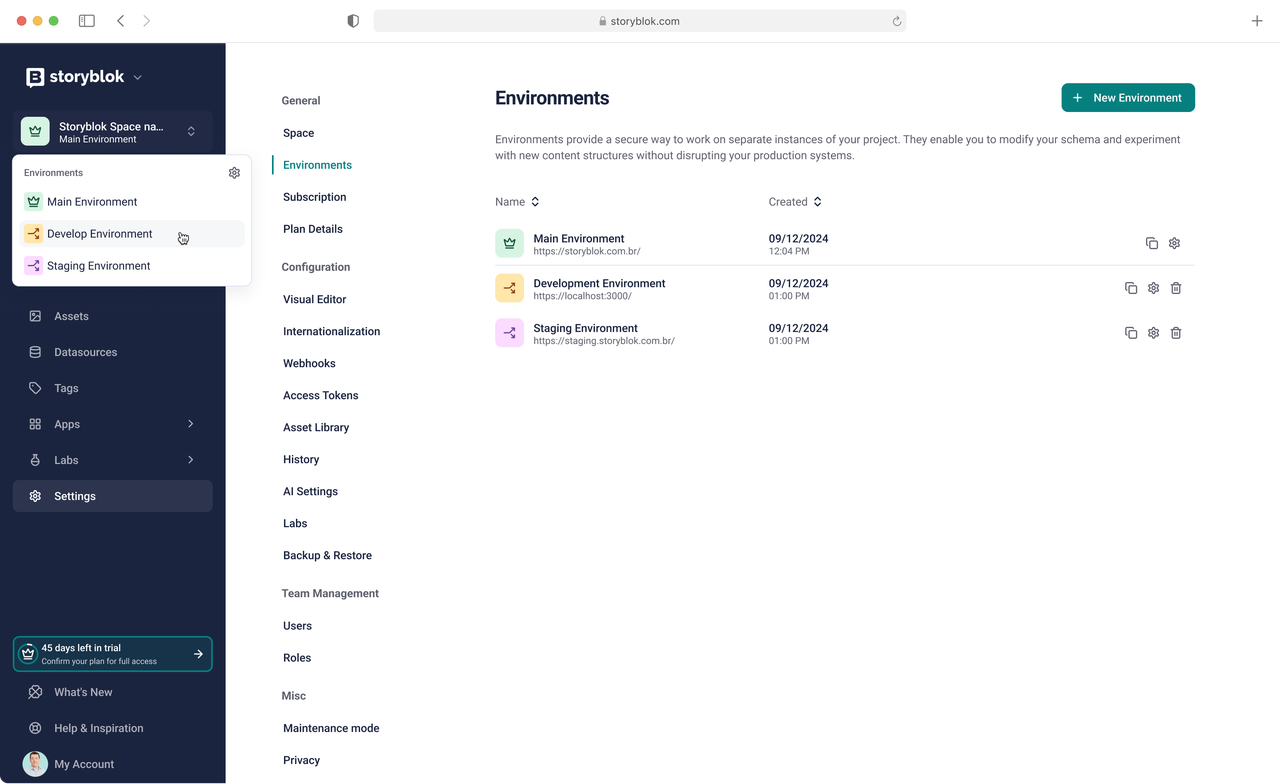
Set up your environment from your production space and decide what comes with it: your custom roles and user assignments, and your asset folder structure and internal tags.

Environment switcher
A sidebar control shows which environment you're working in and lets you move between every environment tied to the same production space.

Environment-scoped access tokens
Restrict a personal access token to a single environment, so integrations and scripts can never reach production.
Frequently Asked Questions
You asked, we answered!
-
01 Can an environment replace my development space?
No, we recommend keeping both. An environment is a copy of a production space, created to rehearse changes against your real content. A development space is a permanent, standalone space where you build and version your components and content model, typically with Git as the source of truth and CI pushing schemas to production. An environment starts as a point-in-time copy, drifts from the moment it's created, and is meant to be deleted and recreated when you need a current copy, so it can't hold your schema history or feed more than one production space.
-
02 When is an environment the right choice?
When the risk is in your data rather than your structure. Rehearse a bulk field migration, a content tree restructure, a spreadsheet or legacy-CMS import, or any automation, AI tool, or Management API script whose blast radius you can't fully predict. Fixture content only surfaces the cases someone thought to build; a copy of your real space surfaces the empty required field and the half-translated locale nobody anticipated. Structural changes (a new component schema, a field type change, a new content type) are best designed and versioned in a development space, then tested in an environment to see how they behave against real content.
-
03 How do environments and development spaces work together?
Most changes use both, in order. The schema change is designed and reviewed in your development space, then pushed to production through CI. The data migration that fills the new field is rehearsed in an environment against a copy of your real content, and only run on the live space once you've confirmed the result. Structural risk and data risk get handled separately, and production is only ever touched by work that's already been validated somewhere else.
-
04 What can't an environment do today?
Environments are non-production spaces: no uptime guarantee, no custom domain support, and no production-level support, so a public front end should never point at one. There's also no visual tool for promoting changes yet, so promotion and synchronization run through the Storyblok CLI, which can also duplicate workflows, releases, pipelines, and other app configurations. Environment creation itself duplicates stories, blocks, and datasources, plus your asset folder structure, tags, users, and custom roles if you choose them.
-
05 Is this the complete vision for environments?
No. This first release is deliberately focused: a safe place to test the work that carries the most risk. It's the first step in a longer roadmap we're building with input from the teams using it.
Start with one environment, free
If you're on Storyblok's Premium or Elite plan, your first Environment per Organization is included.
Create it from your production space and start testing today.