

Introduction to the Content Delivery API
The Storyblok Content Delivery API follows REST principles, with predictable, resource-oriented URLs and HTTP response codes that indicate errors.
The API uses standard HTTP features, such as query parameters and verbs, and works with any HTTP client. It also supports cross-origin resource sharing (CORS), so browser-based applications can call it directly. All responses, including errors, return JSON.
OpenAPI spec
Section titled “OpenAPI spec”OpenAPI is a standard format that provides structured, accurate data about an API’s endpoints, schemas, and parameters.
Download the Content Delivery API’s complete OpenAPI spec (YAML) and explore it in an API client, or import it into an AI coding agent to produce accurate, up-to-date API calls.
Base URLs
Section titled “Base URLs”The base URL for the Content Delivery API depends on the server location of the space. Below are the available endpoints for different regions:
https://api.storyblok.com/v2/cdnhttps://api-us.storyblok.com/v2/cdnhttps://api-ca.storyblok.com/v2/cdnhttps://api-ap.storyblok.com/v2/cdnhttps://app.storyblokchina.cn/v2/cdnOrganizations on enterprise plans can also use a second URL:
https://enterprise-api.storyblok.com/v2/cdnhttps://enterprise-api-us.storyblok.com/v2/cdnhttps://enterprise-api-ca.storyblok.com/v2/cdnhttps://enterprise-api-ap.storyblok.com/v2/cdnAuthentication
Section titled “Authentication”API requests must be authenticated by providing an API access token as a query parameter. Learn more in the access tokens concept.
Consider the following example on how to fetch published stories:
curl "https://api.storyblok.com/v2/cdn/stories\?token=wANpEQEsMYGOwLxwXQ76Ggtt\&version=published"// storyblok-js-client@>=7, node@>=18import Storyblok from "storyblok-js-client";
const storyblok = new Storyblok({ accessToken: "krcV6QGxWORpYLUWt12xKQtt",});
try { const response = await storyblok.get('cdn/stories', { "version": "published" }) console.log({ response })} catch (error) { console.log(error)}$client = new \Storyblok\Client('YOUR_STORYBLOK_SPACE_ACCESS_TOKEN');
$client->getStories([ "version" => "published"])->getBody();HttpResponse<String> response = Unirest.get("https://api.storyblok.com/v2/cdn/stories?token=wANpEQEsMYGOwLxwXQ76Ggtt&version=published") .asString();var client = new RestClient("https://api.storyblok.com/v2/cdn/stories?token=wANpEQEsMYGOwLxwXQ76Ggtt&version=published");var request = new RestRequest(Method.GET);
IRestResponse response = client.Execute(request);import requests
url = "https://api.storyblok.com/v2/cdn/stories"
querystring = {"token":"wANpEQEsMYGOwLxwXQ76Ggtt","version":"published"}
payload = ""headers = {}
response = requests.request("GET", url, data=payload, headers=headers, params=querystring)
print(response.text)require 'storyblok'client = Storyblok::Client.new(token: 'YOUR_TOKEN')
client.stories({:params => { "version" => "published"}})let storyblok = URLSession(storyblok: .cdn(accessToken: "wANpEQEsMYGOwLxwXQ76Ggtt"))var request = URLRequest(storyblok: storyblok, path: "stories")request.url!.append(queryItems: [ URLQueryItem(name: "version", value: "published")])let (data, _) = try await storyblok.data(for: request)print(try JSONSerialization.jsonObject(with: data))val client = HttpClient { install(Storyblok(CDN)) { accessToken = "wANpEQEsMYGOwLxwXQ76Ggtt" }}
val response = client.get("stories") { url { parameters.append("version", "published") }}
println(response.body<JsonElement>())Errors
Section titled “Errors”The Content Delivery API uses standard HTTP response codes to indicate the success or failure of an API request.
Caching
Section titled “Caching”Caching is the process of storing data so that future requests for that data can be served faster. Instead of generating a response from scratch for every request, a cached copy is served, reducing the load on the server and speeding up response times. To deliver content and assets as fast as possible, Storyblok leverages a content delivery network (CDN) powered by Amazon CloudFront.
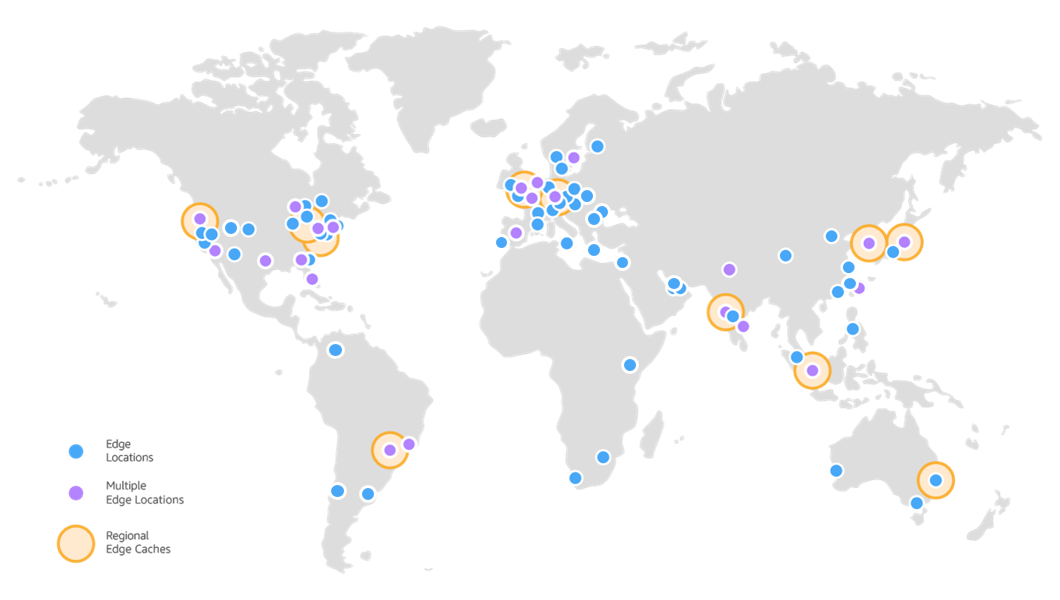
AWS CloudFront edge server locations on a world map
Rate limits
Section titled “Rate limits”The Storyblok Content Delivery API is subject to rate limits to ensure fair usage and optimal performance. The following rate limits apply:
| Type of request | Rate limit |
|---|---|
| Cached requests from the CDN | 1000 per second |
| Single content entries | 50 per second |
Listings with fewer than or equal to 25 entries |
50 per second |
Listings with 25 to 50 entries |
15 per second |
Listings with 50 to 75 entries |
10 per second |
Listings with 75 to 100 entries |
6 per second |
The rate limit per second will be proportionately reduced when opting for more than 25 entries per request via the pagination parameters.
To ensure compliance with the rate limits, consider the following practices:
- Throttling: If a
429status code is received, slow down requests by introducing delays to allow graceful recovery. - Caching: Use cached requests whenever possible, as they have higher rate limits. Learn more in the caching concept.
- Retrying: Implement a retry strategy with exponential backoff for failed requests due to rate limit errors.
- Monitoring: Set up monitoring and alerting to track API usage and detect rate limit breaches early.
Pagination
Section titled “Pagination”To efficiently handle large datasets, the Content Delivery API supports pagination for all the stories, links, and datasource entries endpoints. This allows users to navigate through large datasets by retrieving a specific number of entries per page and requesting subsequent pages as needed.
Paginated endpoints accept two parameters:
page: An integer value representing the page number to retrieve. Increase this value to receive the next page of entries. Default is1.per_page: The number of entries per page. Default is25. Maximum is1000(100for stories).
Paginated API requests include two properties in the response headers:
total: Indicates the total number of items available across all pages.per_page: Specifies the number of items per page as per your request.
These values can be used to implement efficient pagination strategies.
Further resources
Section titled “Further resources”Was this page helpful?
This site uses reCAPTCHA and Google's Privacy Policy (opens in a new window).Terms of Service (opens in a new window) apply.
Get in touch with the Storyblok community